Most AI tools write. Jev doesn’t. It only answers closed questions: pick a category, give a score, say yes or no.
That makes it useless for drafting a post. It also makes it fast and cheap enough to read hundreds of ads, posts, or survey answers in seconds, which is exactly the work most of us never get around to.
This guide shows you how Jev works, how to set it up step by step, and 5 marketing uses with a ready-to-paste prompt for each.
What Jev is: a model that decides instead of writing
Jev launched on September 15, 2026. It’s made by TypeSafe AI, a startup led by Diogo Almeida, a former OpenAI researcher who worked on the technology behind ChatGPT.
You send Jev two things: the text you want judged (a post, an ad, an email) and your questions about it. It sends back an answer to each question with a probability attached. It answers all your questions at once, in about 70 to 500 milliseconds.
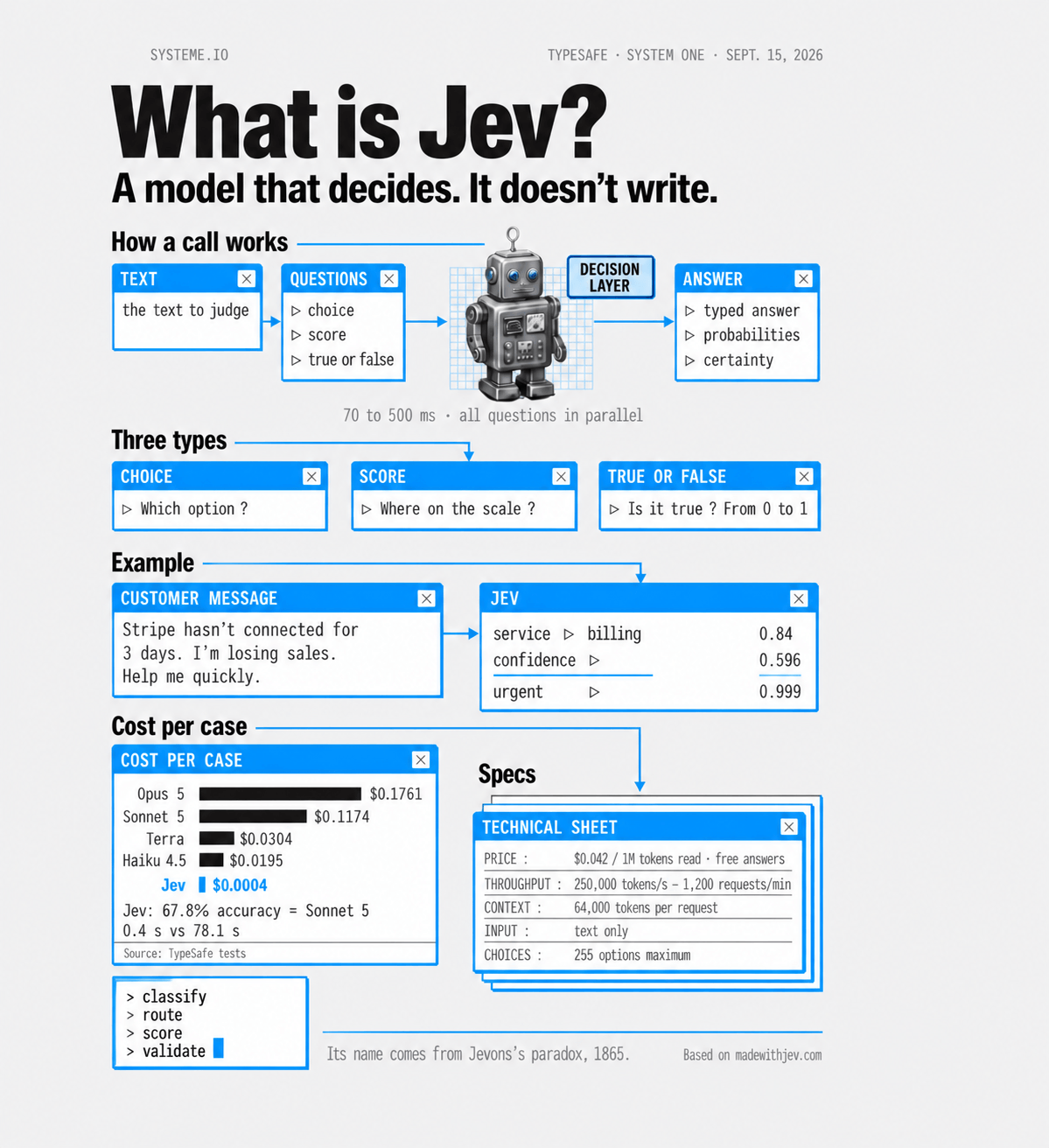
Your questions can take 3 forms
What it costs
According to TypeSafe’s pricing, Jev costs $0.042 per million tokens of text it reads, and its answers are free. In practice, sorting a few hundred posts usually costs less than a cent in Jev fees.
TypeSafe says Jev is 20 to 200 times faster and 40 to 400 times cheaper than chat models on decision tasks. Those are the company’s own benchmarks, run on workflows its team designed, so treat them as a best case rather than a promise.
Jev is a nod to the Jevons paradox. In 1865, economist William Stanley Jevons noticed that as steam engines burned coal more efficiently, Britain used more coal overall. When something gets cheaper to use, people find more ways to use it.
Set up Jev in Claude Code in 4 steps
Jev doesn’t work inside a regular Claude chat. You use it through Claude Code, the Code tab in the Claude desktop app, which comes with paid Claude plans. Setup takes a few minutes and you only do it once.
-
Create your TypeSafe API key
Go to the TypeSafe console, create an account, and add a few dollars of credit. At Jev’s prices, that covers a lot of testing.
Then open API Keys in the left menu, click Create key, and keep the key somewhere safe.

The API Keys page in the TypeSafe console. Click to enlarge. Stuck on a waitlist? Jev is also available on OpenRouter. Create a key in your OpenRouter settings instead.
-
Open Claude Code in a new folder
In the Claude app, click the Code tab and choose a new folder. Call it “Jev.” Everything Claude builds for you will be saved there.
-
Install the official TypeSafe plugin
The plugin gives Claude a skill that teaches it how to use Jev. Paste this prompt into Claude Code, approve when Claude asks permission to run the commands, then start a new session so the skill loads.
Install the official TypeSafe plugin. Run these two commands in the terminal:
claude plugin marketplace add typesafe-ai/skills
claude plugin install typesafe@typesafe-ai
Tell me when it's done.
-
Store your key safely
Paste this prompt. In the file that opens, paste your key right after the = sign, then save and close the file.
Create a .env file in this folder containing the line TYPESAFE_API_KEY= and open it for me. Never ask me to paste my key into the chat.
Using an OpenRouter key? Add this sentence at the end of the prompt: “This is an OpenRouter key, so connect to Jev through OpenRouter.”
From here, start every request with “Use Jev to…” Claude loads the skill, writes a small program that sends your texts and questions to Jev, runs it, and gives you the answers counted and ranked. You never touch the code: Claude writes it, you just talk to Claude.
5 ways to use Jev for your marketing
Jev doesn’t create anything. It judges what already exists. So every idea below starts from a pile of data you already have and never had time to sort.
Words in [brackets] are the parts to replace with your own details.
Break down the ads in your market
Pull the ads running in your niche and let Jev filter out the ones that don’t target your customer. Then have it label every remaining ad by hook and offer. You end up with a short list of long-running ads worth studying, and a clear picture of what everyone else is promising.
If Claude can’t pull the ads directly, save the ad links or text into a file first and point the prompt at that file.
Use Jev to analyze the ads in my market.

Pull the active Meta ads about [your topic] in [your country] from the Meta Ad Library.

For each ad, ask Jev:
- Does it target the same customer as me ([describe your customer in one line])? (yes/no)
- What's the hook? (number, question, promise, story, before/after, other)
- What's the offer? (free resource, course, coaching, product, other)

Keep the ones that target my customer. Then give me the 10 that have been running the longest and the 10 with the most reactions or reach, with their links and what they have in common.
Find what really gets reactions in your content
Give Jev your last 30 posts or emails with their numbers. It tags each one by topic, format, and hook, then Claude matches those tags against your likes, shares, and comments. You see which labels show up most in your best performers.
With a few dozen posts, you’re looking at patterns, not proof. Treat what you find as your next thing to test.
Use Jev to figure out what makes my content get reactions.

My last 30 posts are in [your file or URL], with their likes, shares, views, and comments.

For each post, ask Jev:
- What's the topic? (choose from: [your 4 or 5 topics])
- What's the format? (story, list, tip, behind the scenes)
- What's the hook? (number, question, scene, strong opinion)

Then match its answers against the reactions, and tell me the 2 labels that get the most reactions.
Review your draft before you publish
Ask Jev a set of questions about your draft, rewrite the weakest part, and score it again. Stop when the scores stop going up.
Creator Rob Hallam built a version of this for X. His system asks 61 questions about every post in about a second, and he shared it for free.
Rob Hallam on XHow he scores his posts with Jev, with a link to try his tool
Use Jev to review my draft before I publish it.

My draft: [paste your post]
Where I'm posting it: [LinkedIn, X, Instagram...]

Ask Jev:
- Does the first line make you want to keep reading? (score 1 to 5)
- What's the hook? (number, question, story, strong opinion, other)
- How concrete is it? (score 1 to 5)
- Is it clear who this post is for? (yes/no)
- Does it beg for engagement? (yes/no)

Then rewrite only the weakest part, score the new version with the same questions, and repeat until the scores stop improving. Show me each version with its scores.
Test your ideas on your target audience before you send
Torn between 10 subject lines? Describe your ideal customer, have Claude write a range of profiles based on that description, and ask Jev whether each profile would open each email.
It won’t pick the winner for you. It weeds out the weak options before you send anything, so your real A/B test starts with stronger candidates.
Sim Audience ran this kind of test on two launch tweets, using more than 4,000 profiles based on real survey participants. It took 12 seconds.
Sim Audience on XA simulated A/B test of two tweets, run with Jev
Use Jev to test my email subject lines.

Write 20 profiles of my ideal customer: [describe them in 2 lines]. Vary their mood (overwhelmed, skeptical, in a hurry, already a customer...).

My subject lines: [paste your subject lines]

Then ask Jev, for each profile and each subject line: "Would you open this email?" (yes/no)

Rank my subject lines from most opened to least opened.
Understand what your audience actually needs
If you ask new subscribers a welcome question, you’re probably sitting on hundreds of answers nobody has read. Jev can sort all of them in under a minute: which problem each person describes, whether it’s an objection to buying, and whether they’re asking for help.
You get a count of the most common problems, with real phrases from your audience for each one. Those phrases are strong raw material for your next email or sales page.
Use Jev to sort my subscribers' answers.

They're in [your file]. First, remove all names and email addresses.

For each answer, ask Jev:
- Which problem is this person describing? (choose from: [your 5 main problems], other)
- Is it an objection to buying? (yes/no)
- Are they asking me for help? (yes/no)

Then count how often each problem comes up, and give me 3 real phrases from subscribers for each one.

Bonus: turn the results into a simple chart I can share.
Your plan for this week
Three steps to get your first real results from Jev.
- Set up Jev with the 4 setup steps.
- Run the prompt from idea 2 on your last 30 posts or emails.
- Pick the 2 labels that stand out, and use them in your next post.
Want more ideas? See what people are building with Jev at madewithjev.com.