
Sellfy vs. Shopify — Which Platform Helps Your Online Store Grow?
If you’re torn between signing up for Sellfy or Shopify, then this post is especially for you.
Here, we’ll discover which ecommerce platform is the best to help new and established online businesses maximize their online sales.
We’ll also compare essential features, extras, and pricing between these 2 software options.
Are you ready to see who wins this epic Sellfy vs. Shopify showdown?
Let’s go!
1. What is Sellfy?
Sellfy logo
Founded in 2011 by Maris Dagis, Sellfy is an ecommerce platform built to help creators sell their products and services online.
They promise an easy-to-use interface to help you build an online store or add selling power to your pre-existing website, without the need for technical experience or the ability to code.
While Sellfy is by far the younger of these two ecommerce platforms, they’re growing in popularity with over 60,000 creators using the software.
How does this affect Shopify, one of the biggest names in the ecommerce game?
2. What is Shopify?
Shopify logo
Tobias Lütke, Daniel Wienand, and Scott Lake are credited with founding Shopify in 2006.
This multi-national company has their HQ in Canada and can boast of having 2.1 million+ active users every day — a sure sign of Shopify’s immense popularity.
Shopify’s software is built to help users launch, scale, and manage their online business.
This includes managing every aspect of your online campaigns, although you’ll need to use some applications and integrations to achieve it.
Is popularity enough to make you choose this ecommerce giant?
Or do you prefer the newer option, Sellfy?
Keep reading to see the best (and worst) of both platforms.
3. Pros and cons of Sellfy and Shopify
If you’re looking for a quick comparison of Sellfy vs. Shopify, then this section is for you.
We’ve put together a comprehensive list of each platform's pros and cons to make it easier for you to make the right choice for your online store.
Let’s start with Sellfy’s pros and cons, based on real customer reviews:
Pros

Intuitive user interface (UI) and dashboard
Many built-in tools assist with specific marketing and ecommerce tasks
Plenty of store templates to speed up the building process
No delay between when you make a sale and when you’re paid out

Cons
$200K cap/year on your potential earnings
No affiliate marketing features and integrations can be clunky and slow
Not enough flexibility when it comes to creating your store from scratch
Free plan is limited to just 10 products
Now, compare those to what these users think about Shopify:
Pros
Easy to build and customize your online store using their themes and templates
Many in-house integrations and apps to assist with other marketing activities
Supports 100+ payment gateways, giving you and your customers more options
Easier to scale with this platform
Cons
The many features and dashboards can be overwhelming for a beginner
Integrations can be clunky and difficult to set up
Delayed payout from the app plus high transaction fees (unless you use Shopify Payments)
No Free plan, just a 14-day free trial
Still not sure which software to choose?
Then let’s dig into a detailed comparison between the two ecommerce platforms, their features, and more!
4. In-depth feature comparison
A list of ecommerce features won’t tell you if Shopify or Sellfy is the right platform for you.
That’s why we’ve compiled this in-depth comparison of what each platform can do, which features you’ll gain access to, and how those will ultimately benefit your business.
4.1. Ecommerce software
Ecommerce businesses, like any other online business, need several different marketing elements to help them grow and generate a return on investment (ROI).
We’ll start with the most obvious and necessary perk on the list — the power to sell.
4.1.1. Sellfy’s ecommerce features
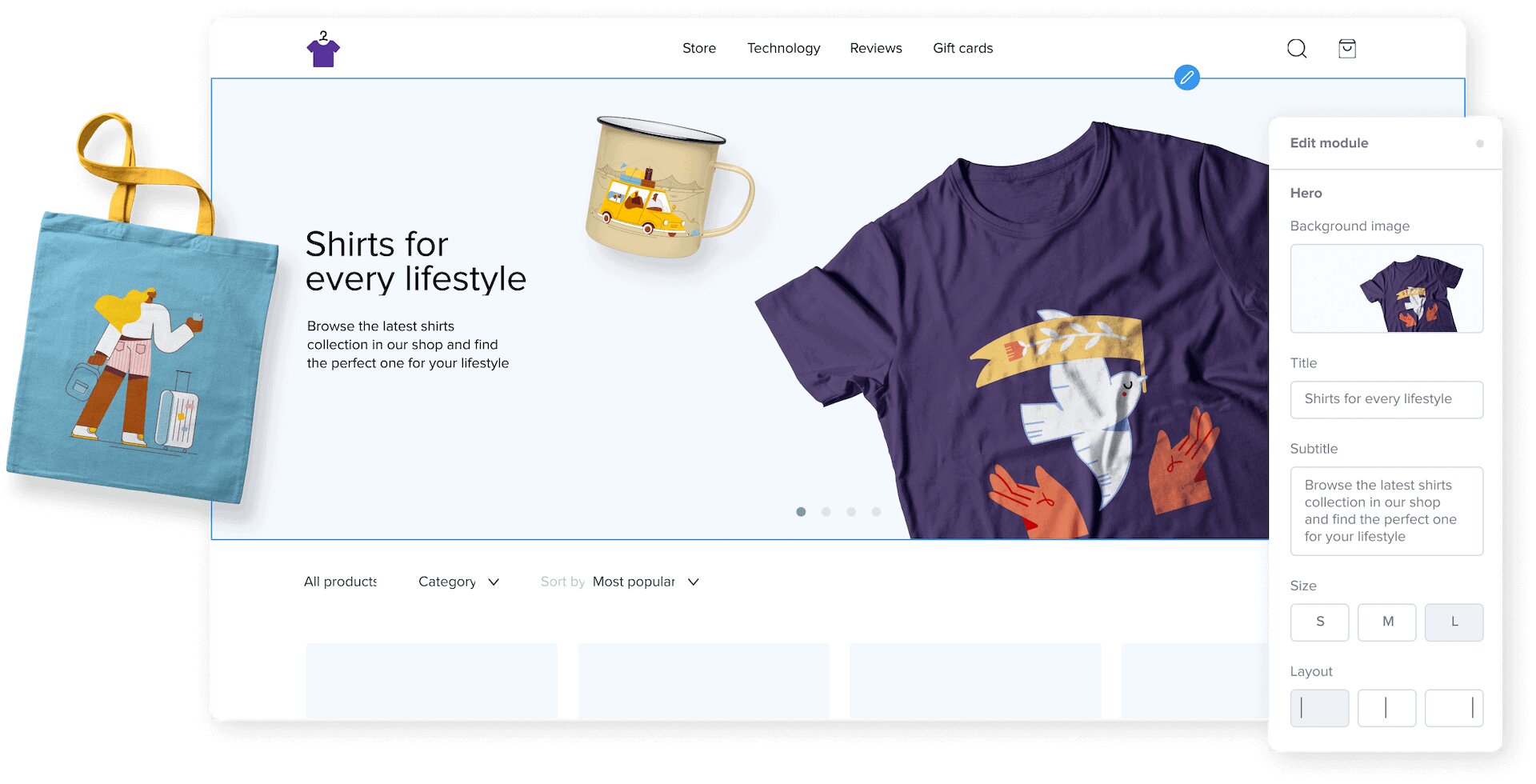
Sellfy’s ecommerce and sales capabilities
Sellfy’s main target audience is creators, so their built-in ecommerce tools are focused on helping them sell products to build an online business.
With Sellfy, you can:
Sell digital products or physical ones
Offer print-on-demand products to create merchandise
Create and sell a membership site or other subscription products
Sell your videos on-demand with live streaming
Accept secure payments from PayPal and Stripe
Use PDF stamping to mark each PDF product file for each customer
Limit product downloads with unique links to prevent unwanted sharing
Unfortunately, these ecommerce features are pretty basic compared to Shopify or an all-in-one solution like systeme.io.
While Sellfy continues to add and upgrade their offering, there’s no estimate on what or when the next update will be.
If advanced options to sell online are what you’re after, keep reading!
4.1.2. Shopify’s ecommerce features

Shopify’s mobile ecommerce app
Ecommerce with Shopify comes with a more sophisticated set of tools to sell online.
With Shopify, you can:
Sell unlimited products to your customers, including digital products and services
Use different sales channels to sell your products
Manage your orders with an all-in-one system, including inventory, shipping, and returns
Integrate with 100+ payment gateways and accept credit card payments
Look after your online store on the go with Shopify’s mobile app
On top of these already fairly impressive features, Shopify includes ecommerce automation,which automatically connects to all of your other Shopify apps.
This functionality further simplifies how you run your online store, as you can use the software to complete certain tasks for you.
Their ecommerce automation software allows you to set the following parts of your business on autopilot:
Inventory — Hide out-of-stock products and re-order when stock is low
Segmentation — Track and tag customers based on their purchase behavior
Fraud identification — Flag risky orders instead of needing to go through each order yourself
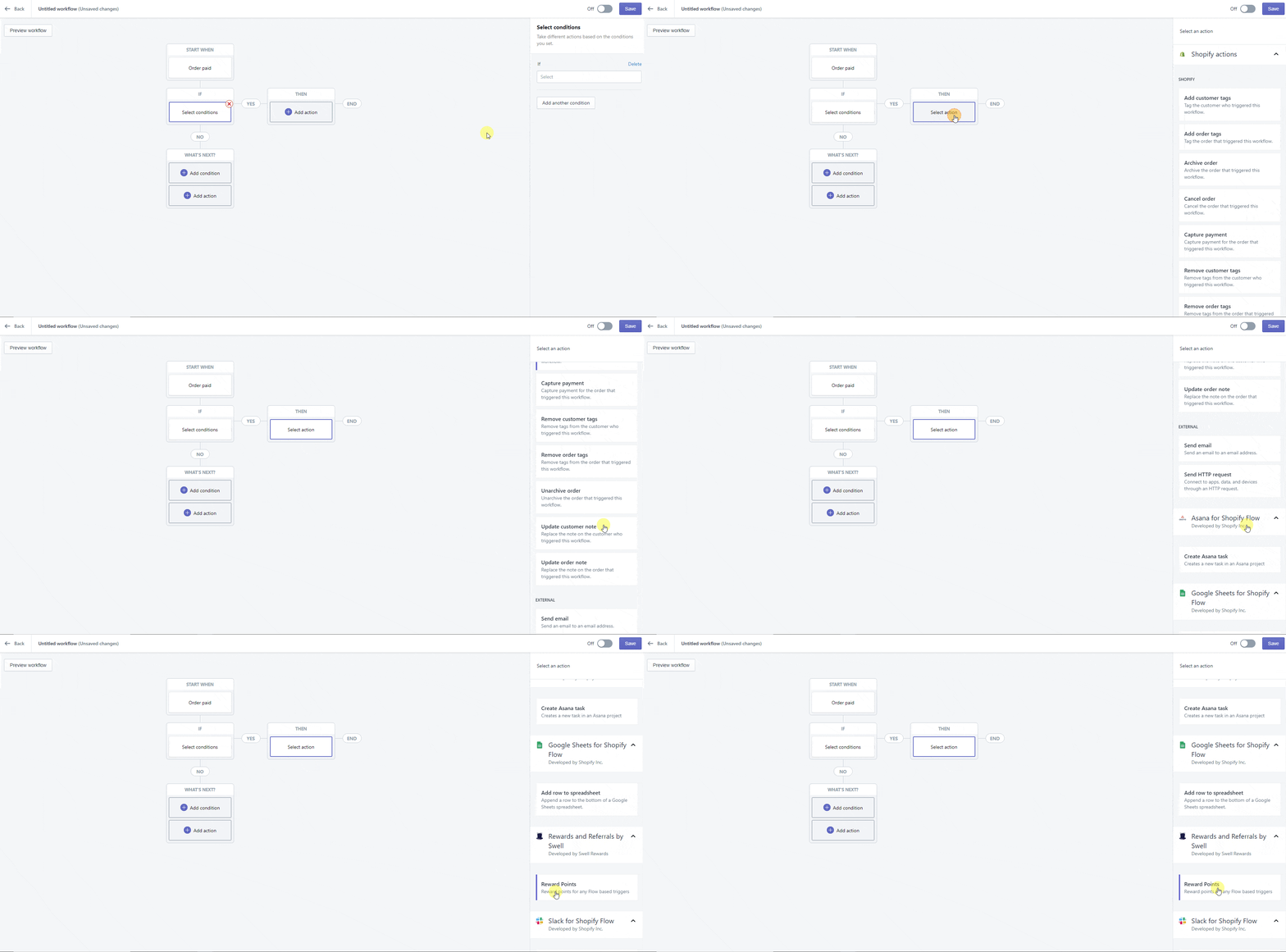
Example of Shopify’s automation workflows
Automation tools like these are a real timesaver, and can help remove some human errors that might jeopardize your business.
For this reason, our score sheet starts at Sellfy: 0 - Shopify: 1.
4.2. Online store
As with any brick and mortar retail store, your digital storefront presents an opportunity for you to make the right impression on your target market.
Both Sellfy and Shopify help their users build an online store, but which platform does it better?
4.2.1. Sellfy’s online stores
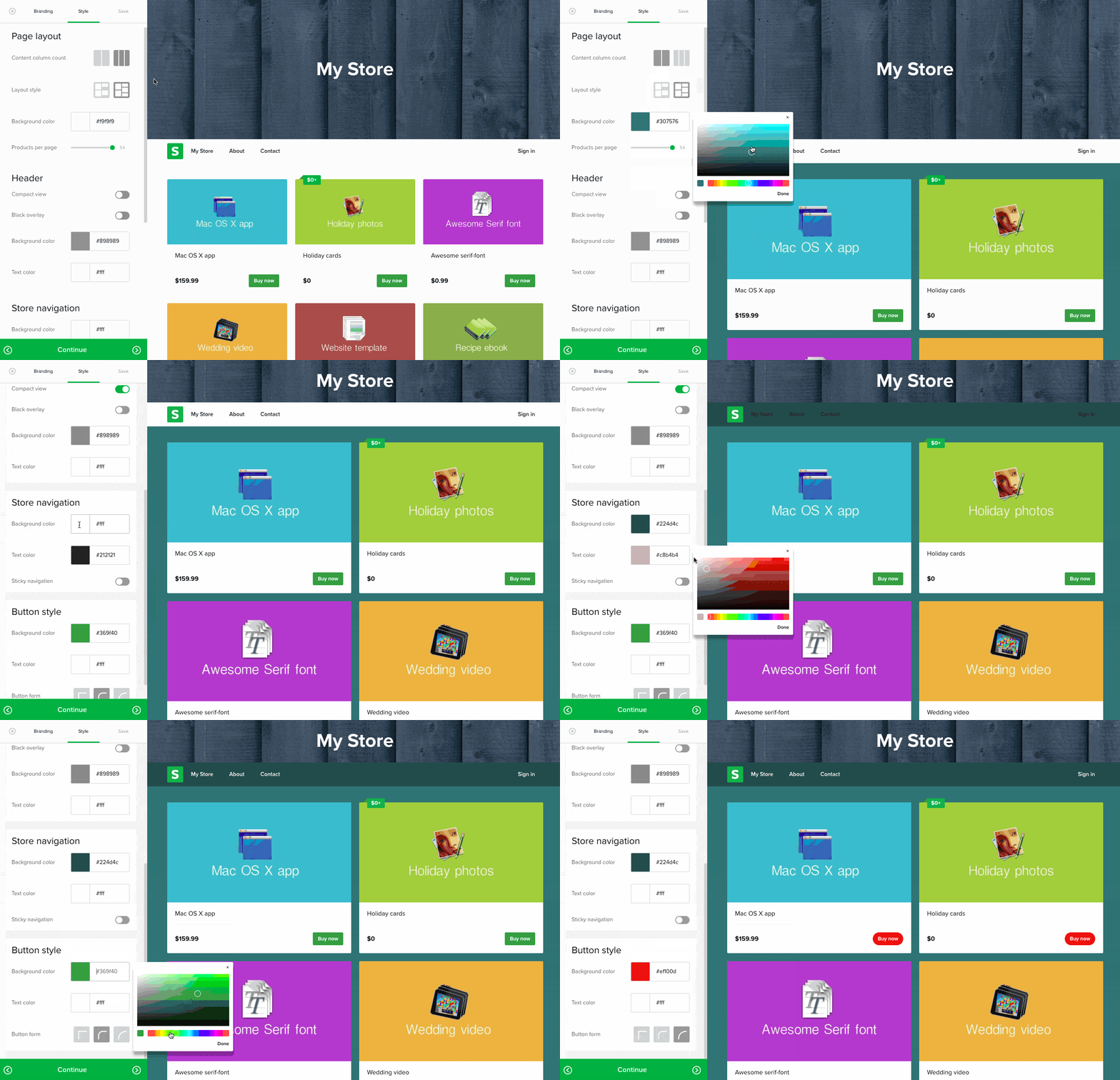
Editing in one of Sellfy’s store templates
Only have 5 minutes to spare?
With Sellfy, that’s all the time you need to create your online store.
Using an online store template from Sellfy, you can:
Add your logo, change the color scheme, edit the layout, and change the language and full store customization
Create a shopping cart so that customers can purchase multiple products
Connect your online store to your own domain
Reach customers on any device with mobile optimized templates
While building a complete online store suits some business owners, Sellfy also provides users with the ability to sell products on their own website.
To this end, they’ve included embedding tools so that you can use their software to sell in any way that works for you.
Here are some of the other ways you can sell with Sellfy:
Embed buttons on your website
Embed product cards to help monetize your content
Embed your Sellfy store to turn your website into a complete selling machine
Easily create product links perfect for social media posts
Implement YouTube cards and end-screens to send watchers to your store in one click
This kind of built-in flexibility will help you grow your ecommerce business and reach a wider audience of potential customers.
Can Shopify match this powerful offer?
4.2.2. Shopify’s online stores
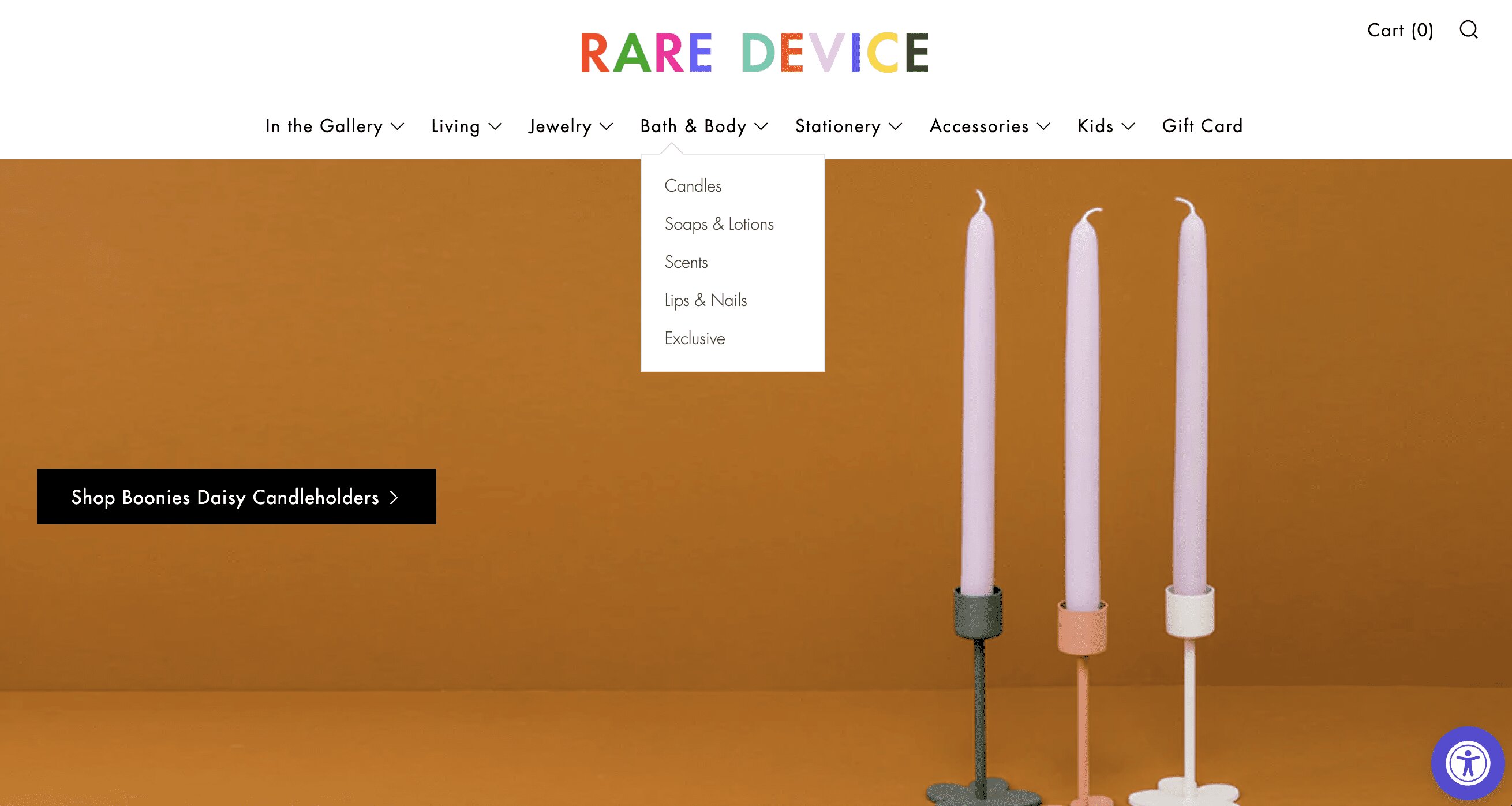
Example of a Shopify storefront
Shopify also states that setting up your ecommerce store will only take minutes.
Instead of templates, they offer themes — which amount to the same thing.
These Shopify themes provide you with everything you need to sell online:
A no-code, drag-and-drop store builder that’s easy to use
Over 70 ready-to-use themes that are mobile-responsive
Speedy check-out options to close more sales
Build a custom storefront by editing the font, colors, and imagery
Just like Sellfy, Shopify goes above and beyond providing you with a simple store customizer tool.
They also include a stack of tools to help you sell your products, your way.
Shopify lets you do the following:
Embed buttons, products, or even an entire shopping cart onto your existing website
Sync catalogs of your physical and digital products to social media platforms
List your physical and digital products on Google to sell while your customers search
Use Shopify apps to add more features to your store
While this seems pretty powerful, many Shopify users have noted that the customization isn’t as extensive as they’d like.
The applications on the Shopify app store aren’t free either, so adding custom features will cost you extra.
If you want to eliminate extra costs altogether, a true all-in-one like systeme.io is your best bet.
However, in the Sellfy vs. Shopify comparison, Sellfy wins the online store round, making the score tied.
Sellfy: 1 - Shopify: 1
4.3. Marketing
What good is your online store if no one knows it exists?
You need to use different marketing strategies to direct traffic to your store and nurture your relationship with your customers.
Do Sellfy and Shopify have built-in marketing tools to help you achieve this?
Let’s find out!
4.3.1. Sellfy’s marketing features
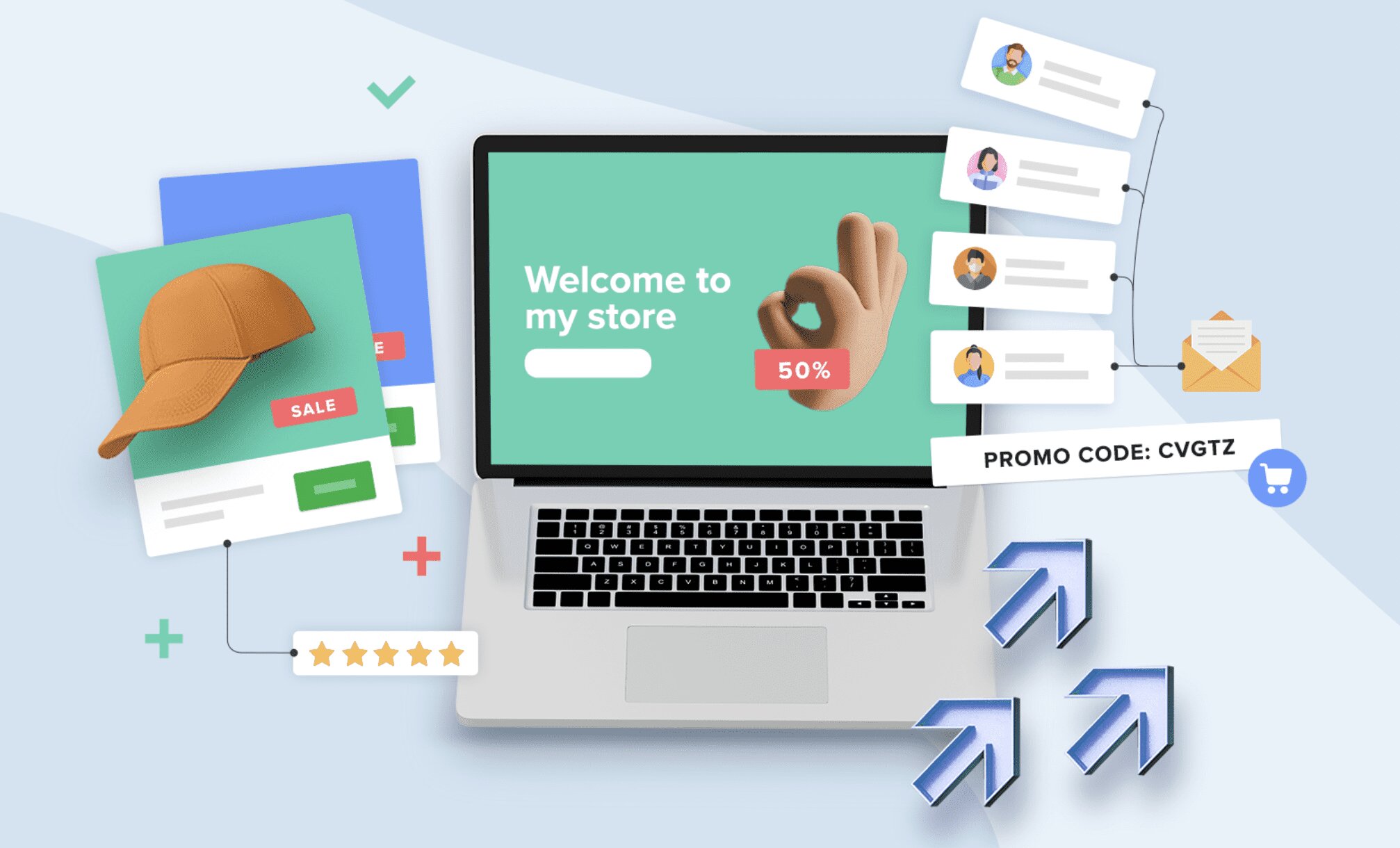
Sellfy’s marketing features
To help you scale your business and outrun your competition, Sellfy will help you market your store.
Their marketing features are split into 4 areas of focus:
1. Email marketing — Create newsletters and send product updates to customers and subscribers
2. Upsells — Increase the value of your orders by upselling your products at the perfect moment
3. Discount codes — Reward your customers and increase sales and engagement
4. Tracking pixels — Add pixels to track your Facebook and Twitter ads from the built-in app market
Sellfy stores have these features built-in, so you won’t need to use multiple integrations to get the job done.
However, you’ll need to upgrade to a Premium plan to get access to all of them and they only manage to cover the basics.
A Shopify store might be the right place to get more ways to market your business.
4.3.2. Shopify’s marketing features
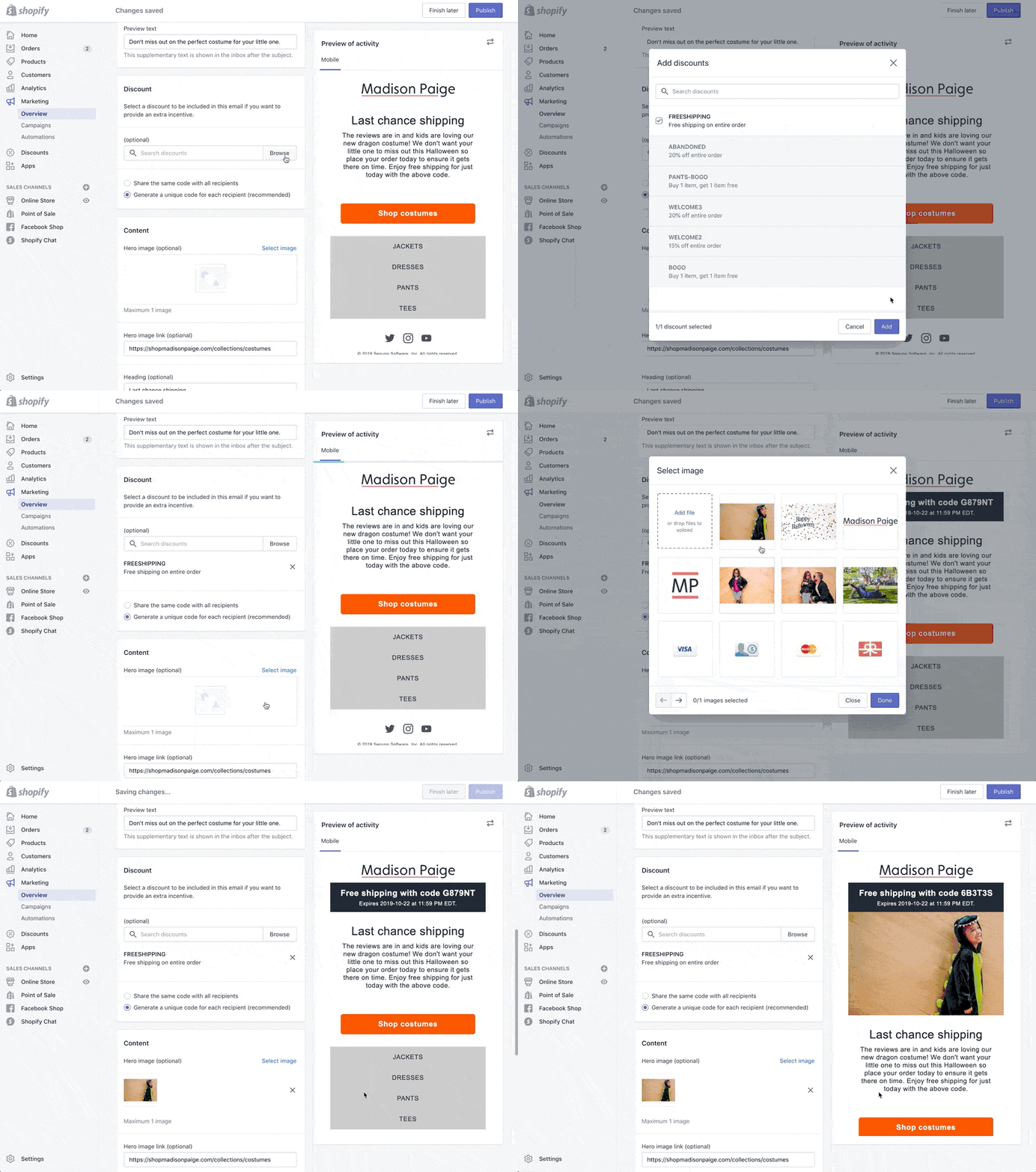
Using Shopify’s marketing tools
With Shopify, you can find the right customers and sell to them at the right moment.
Here’s what you can accomplish with Shopify’s marketing features:
1. Email marketing — Use premium templates to stay in contact with your customers and personalize their shopping experience
2. Automation — Create custom workflows to handle repetitive marketing tasks and scale your business
3. Search engine optimization — Make it easy for your target audience to find your store with the title tag, meta descriptions, and other SEO settings
4. Blogging — Use content marketing to build your authority online and reach a wider audience
5. Customer relationship management — Segment your customers based on their behavior and interests
6. Google Smart Shopping — Use free listings or create a Smart Shopping campaign
7. Facebook Ads — Customize your Facebook shop and create collections perfect for your audience
Need even more marketing features than this?
You can easily integrate with several popular and powerful 3rd-party platforms or download an app from the app market.
When it comes to marketing features, there’s no contest.
Shopify outperforms Sellfy on its own, and with the Shopify app store and loads of integrations at their fingertips, they’ve really upped the ante.
Sellfy: 1 - Shopify: 2
4.4. Reporting and analytics
To truly understand how well your ecommerce business is doing, you need to be able to track and compare your key performance indicators (KPIs).
Both Shopify and Sellfy include analytics and reports, but which one gives you the best measure of success?
4.4.1. Sellfy’s analytics and reports
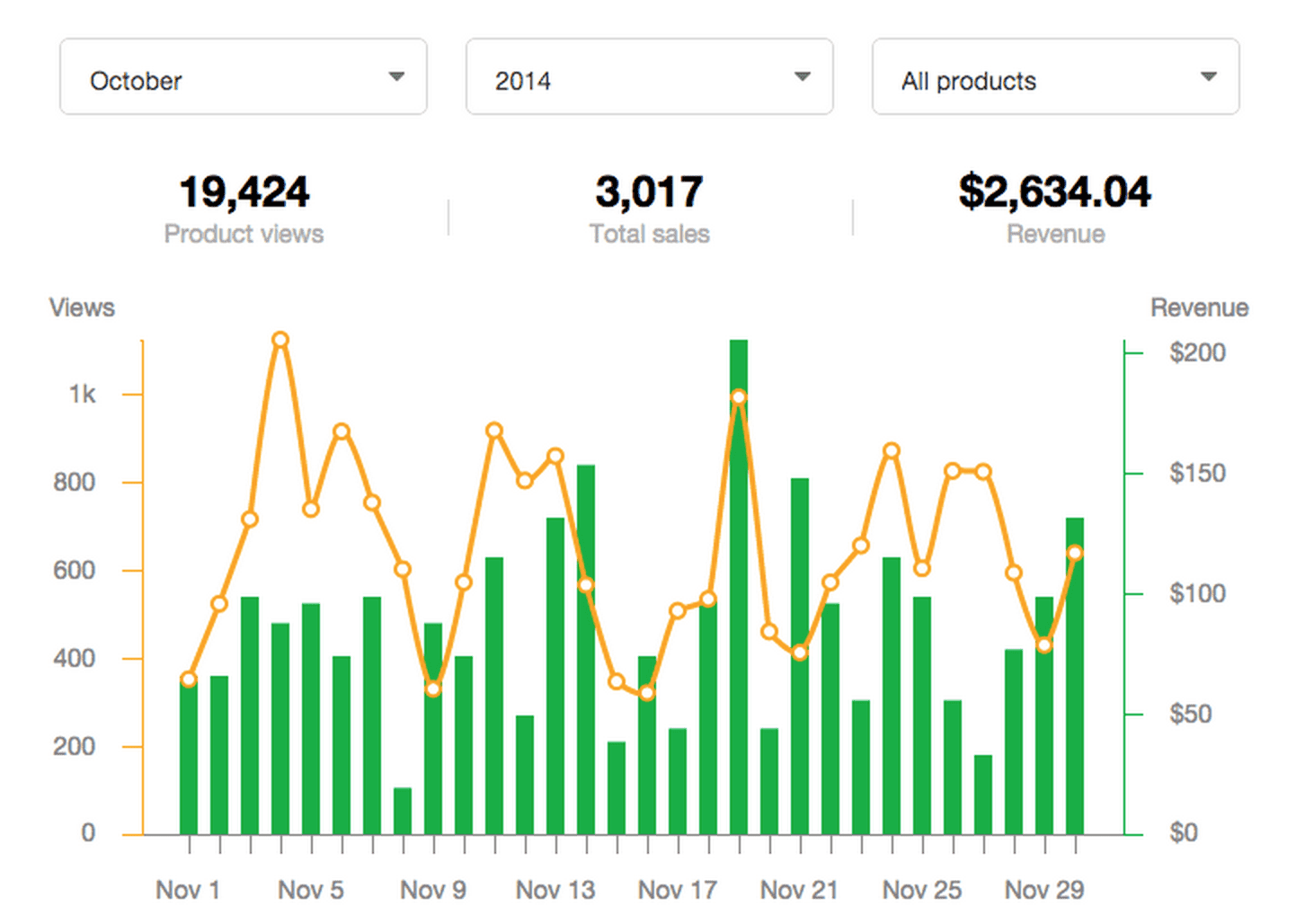
Sellfy’s analytics dashboard
Sellfy’s analytics are focused strictly on your products, providing a clean and easy-to-understand view of your product performance.
Their analytics dashboard includes data on the following:
Product views
Product Sales
Revenue
Customer demographics
It’s simple but effective and won’t overwhelm any newbie entrepreneurs.
You’ll be able to study the relationship between your web traffic and any sales generated over time, and track and take advantage of trends.
Can Shopify do it better?
4.4.2. Shopify’s analytics and reports
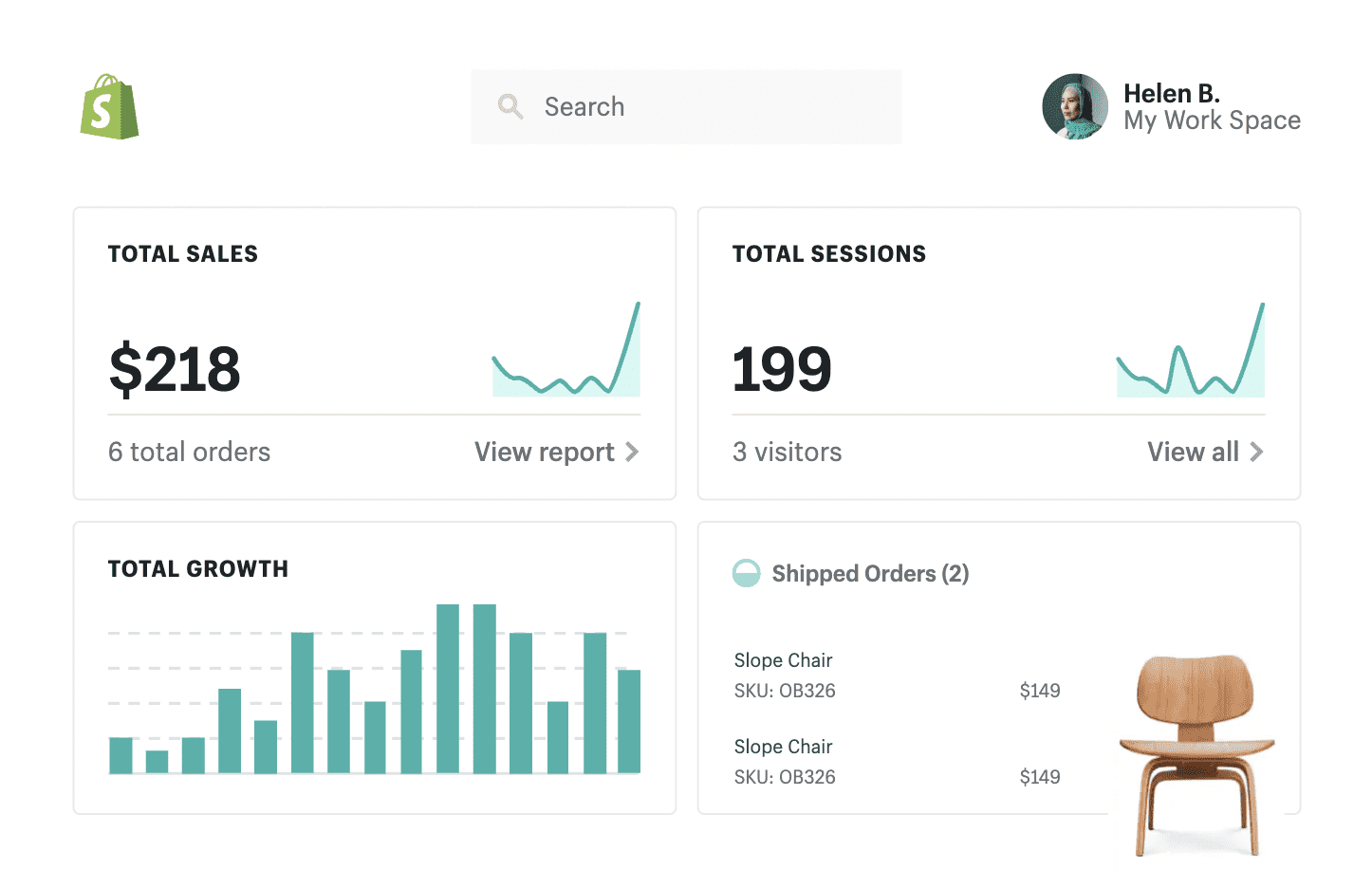
Shopify’s analytics and reporting
The first and maybe most important difference in our Sellfy vs. Shopify reporting battle is that Shopify works withGoogle Analytics.
On top of that essential feature, you can also study these metrics on your dashboard:
Sales
Orders
Traffic
Referrals
Store growth
You can also pretty easily export your reports and send them to other stakeholders, like your accountant or sales team.
However, your reporting remains simplistic with a basic Shopify account — you’ll need to upgrade to their Advanced plan to get advanced features.
For this reason, Sellfy wins, since their analytics dashboard is uncluttered and you get access to it for free.
Sellfy: 2 - Shopify: 2
4.5. Other features
Both platforms include a couple of bonus features that may swing your vote in the Shopify vs. Sellfy debate, so we’ve identified some fan favorites for you.
Will these extras make a difference to you and your ecommerce business?
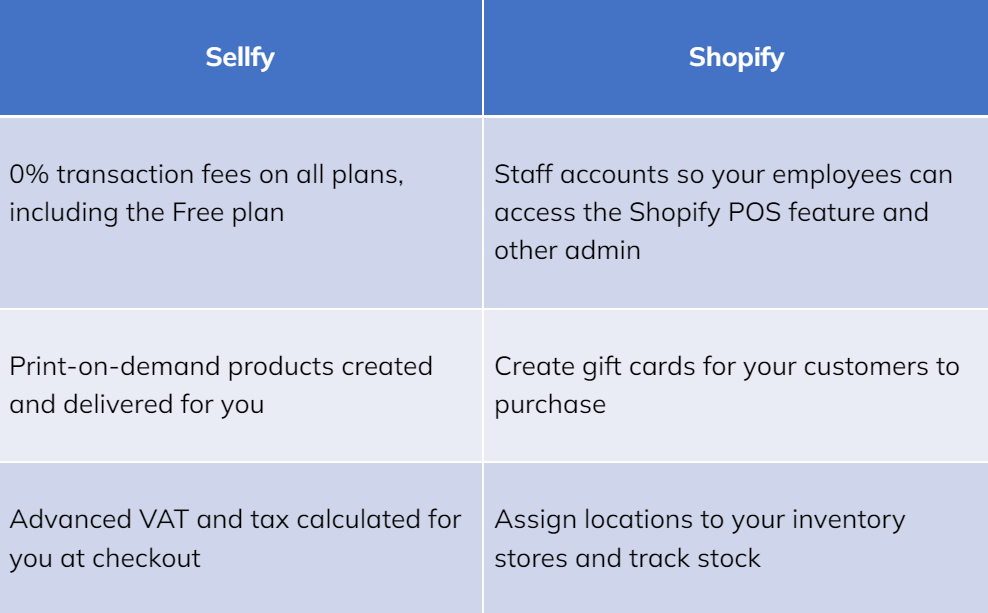
These features will appeal to you depending on your ecommerce store’s unique needs, so we’re calling this one a tie.
Sellfy: 3 - Shopify: 3
5. Pricing
Before you make your choice, there’s just one more thing you need to know about these 2 platforms: How much do they cost?
Keep reading to find out which platform gives you everything your business needs, at a budget-friendly price point.
5.1. Sellfy’s pricing
If you choose Sellfy, you’ll be presented with 4 pricing options:
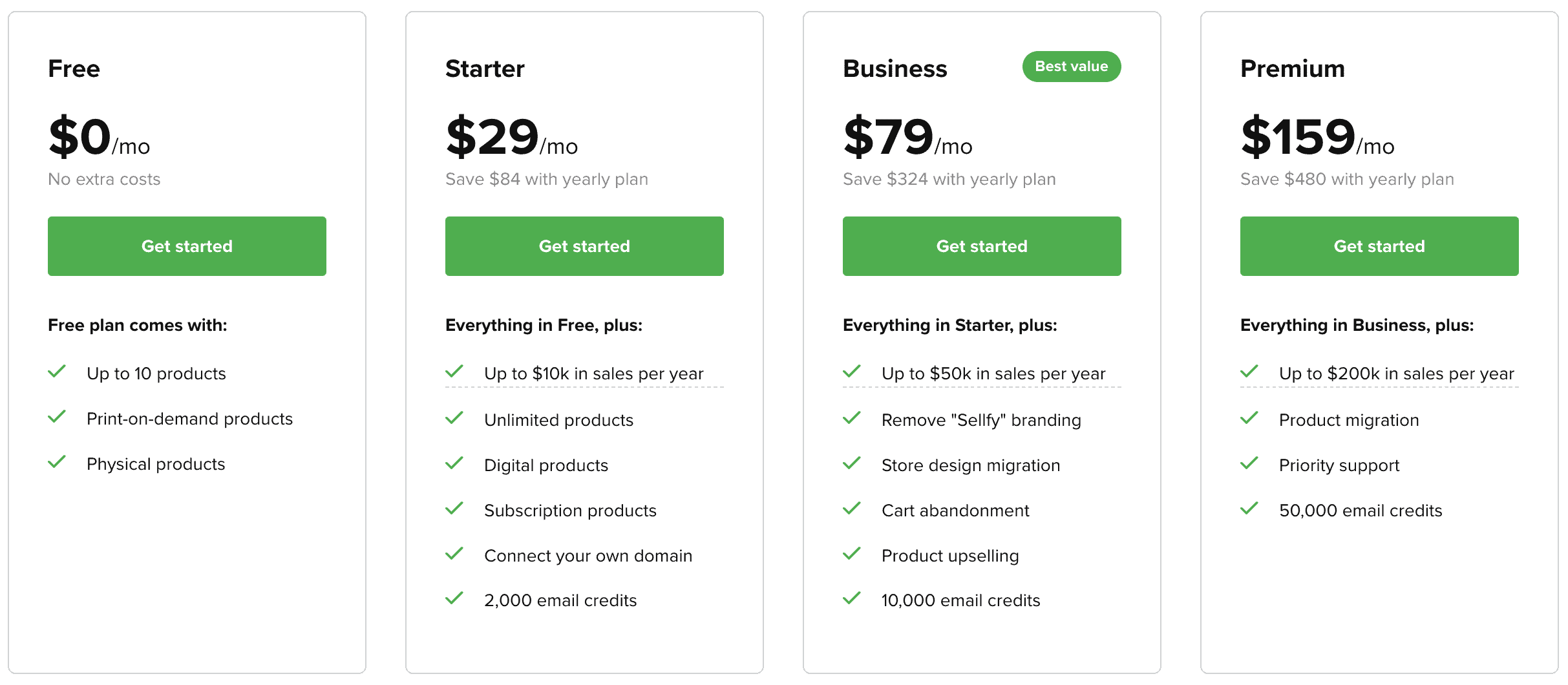
Sellfy’s pricing plans
1. Free plan — $0/month for up to 10 physical or print-on-demand products
2. Starter plan — $29/month for unlimited products of any kind + 2,000 email credits
3. Business plan — $79/month for unlimited products of any kind + 10,000 email credits
4. Premium plan — $159/month for unlimited products of any kind + 50,000 email credits and priority support
When you compare Sellfy’s pricing to many other ecommerce platforms (including Shopify), they come across as a more economical option.
However, you’ll need to consider the following:
You’ll need to opt for the $79/month Business plan to remove any Sellfy branding from your store
Your sales are capped at $200,000/year, and to extend it you’ll need to pay extra and contact them for a custom plan
Their Free plan limits you to 10 physical products and no digital products
If this doesn’t sound worth it to you, keep reading so see how Shopify compares.
5.2. Shopify’s pricing
Shopify offers 3 standard pricing options:
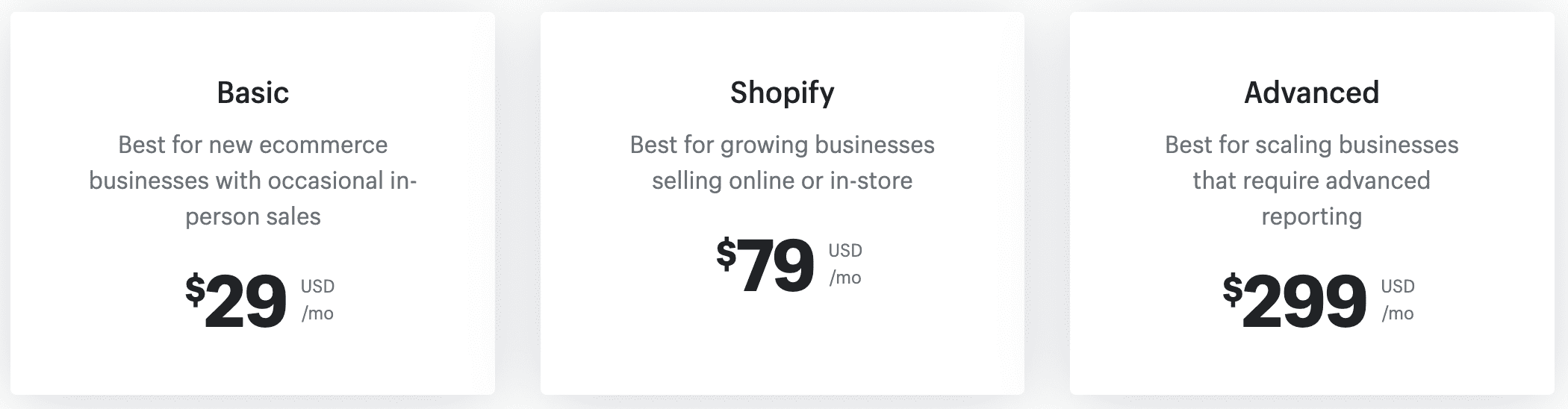
Shopify’s pricing plans
Basic plan — $29/month for ecommerce features, basic reporting, and a 2% transaction fee
Shopify plan — $79/month for more ecommerce features, standard reporting, and 1% transaction fee
Advanced plan — $299/month for all ecommerce features, advanced reporting, and 0.5% transaction fees
All Shopify users can make unlimited sales of their products and access almost all of the features that are on offer.
Ecommerce automation and 3rd-party shipping calculations are only available with an Advanced Shopify plan.
There’s also a payout delay, which you can edit but will still have to contend with.
Unfortunately, a completely Free plan isn’t available, just a short 14-day free trial of the software that doesn’t give you a chance to see if it’s right for you — platforms like systeme.io give you a free option to fully experience it.
On top of these standardized plans, they offer 2 more depending on what your business needs:
Shopify Plus — Extensive features and access built for larger businesses and high-volume sellers with custom pricing
Shopify Lite — Add products and accept payments on your website without any other Shopify features for $9/month
Clearly Shopify is a more complete ecommerce platform, but as the owner of an ecommerce store, there’s more than sales to consider.
You’ll probably need to pay for extra integrations to get more advanced marketing features, and those integrations are clunky and can lead to expensive delays for your business.
Instead, why not partner with an all-in-one marketing platform that includes ecommerce features and more?
6. Systeme.io — The best marketing and ecommerce platform for your online store

systeme.io logo
While both Sellfy and Shopify include some marketing functionality, it’s not enough to run every aspect of your ecommerce venture.
Systeme.iois a digital marketing powerhouse and includes everything you need to start selling online.
Here are some of the ecommerce and marketing features we have to offer:
Sell unlimited physical or digital products and services
Create automation rules and workflows to set your store on autopilot by delivering digital products for you
Accept payments via Stripe and PayPal with no delay or sales-ceiling
Use sales funnels to nurture your leads and convert more customers
Increase average order values with 1-click upsells and order bumps
Use email marketing to contact and help you retain your customers
Build an entire website, sales funnels, and store in one place and eliminate any technical headaches
Run your own affiliate program and have your fans promote your products for you
Scale your business even further and sell online courses or subscriptions to a membership site
Zero transaction fees for all our users and no hidden costs
You can do even more than what we’ve listed using our software.
Does this sound too good to be true?
Spoiler alert, it’s not — keep reading to learn about our even more impressive price point.
6.1. Systeme.io’s pricing
Before we even get to the individual pricing plans, check out what comes standard with every systeme.io account:
Send unlimited emails to your customers and maintain positive relationships that foster customer loyalty
Upload unlimited files like product images, brand designs, printables, and more
Publish unlimited blog posts and build your authority with content marketing
Enroll unlimited students if you’re selling your courses online
View an advanced report builder across your pages and emails
Get online support 24/7 with a response time of 2 hours or less
That’s right, even our Free plan includes these features, making signing up a no-brainer.
Once you’re ready to join us, there are 4 simple and scalable pricing plans available:

systeme.io’s pricing plans
1. Free plan — $0/month for 3 sales funnels, 10 sales/payment pages, 1 order bump, 1-click upsell, and coupon code
2. Startup plan — $27/month for 10 sales funnels, 50 sales/payment pages, 10 order bumps, 1-click upsells, and coupon codes
3. Webinar plan — $47/month for 50 sales funnels, 300 sales/payment pages, 100 order bumps, 1-click upsells and coupon codes, plus webinars
4. Unlimited plan — $97/month for unlimited access to all features mentioned, including a 1-on-1 coaching session
Our Free plan is perfect for brand new business owners, or anyone who wants a strings-free test drive of our platform.
But, if you already have your ecommerce business set up, why not sign up for one of our annual plans?
We’ll give you a 30% discount and migrate your entire business for you, so you can focus on what matters most.
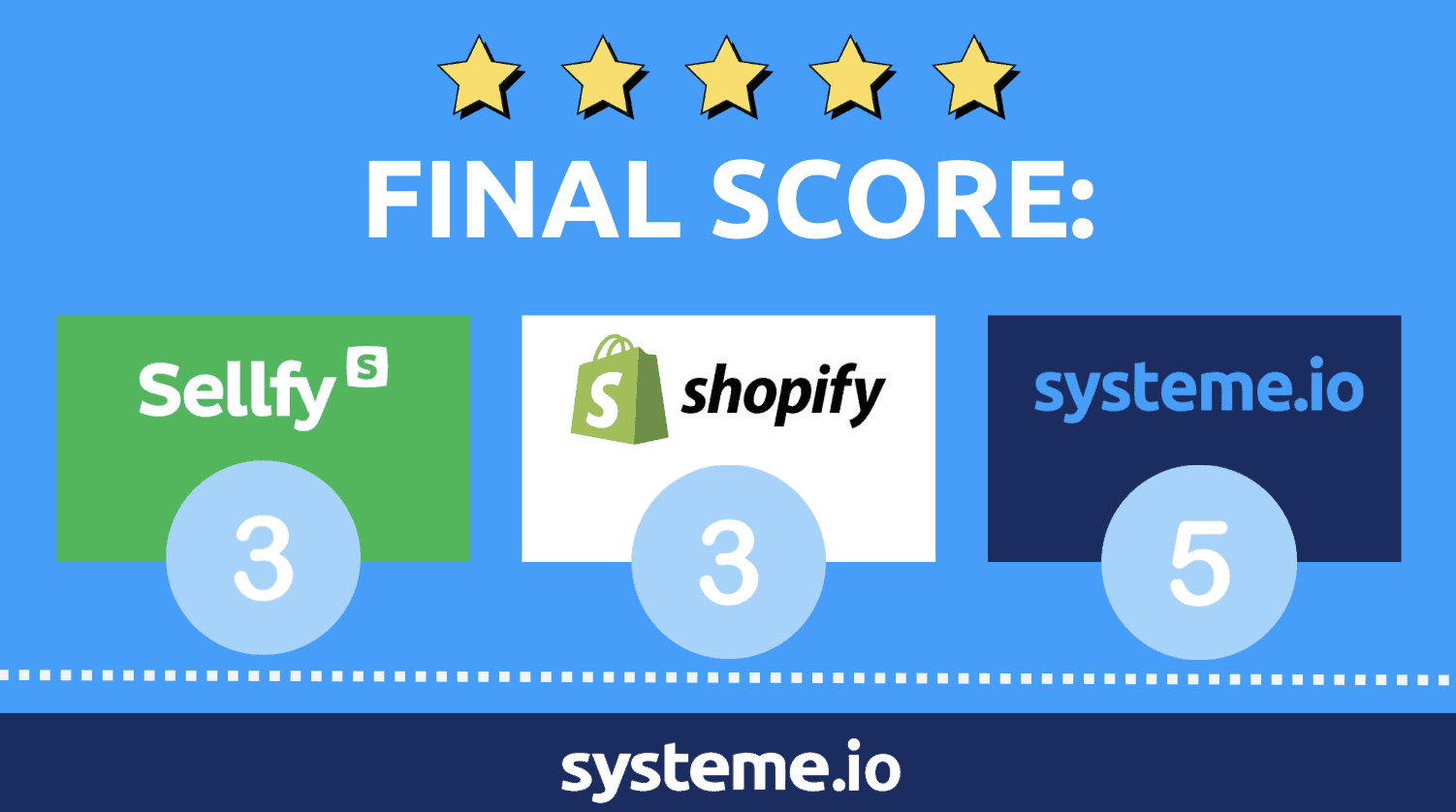
Our final score sheet tallies up like this:
7. FAQs about Sellfy and Shopify
Still curious about these 2 contenders?
We’ve compiled a list ofsome of the internet’s most frequently asked questions about both Shopify and Sellfy.
Yes, judging by the mostly positive reviews you’ll find online.
Here are some of the security measures Sellfy has in place to protect its users:
Sellfy presents users with several different ways to earn a living online.
Here are some ways you can put their software to good use:
Create designs and offer print-on-demand products like shirts, mugs, and badges
Sell your own physical products or become a dropshipper
Offer a subscription service and provide your audience with exclusive content
Write an ebook or create and sell other digital products
Yes.
Shopify is easy-to-use and was built with beginners in mind.
The user interface is pretty intuitive and the learning curve is small.
Unfortunately, their lack of a Free plan leaves this software out of reach for most beginners.
Shopify’s default settings allow you to be paid every business day when there are funds available.
You can also set up a regular payout scheme so that you receive payments either weekly or monthly.
Unfortunately, you won’t receive payment automatically as a Shopify user.
8. Conclusion
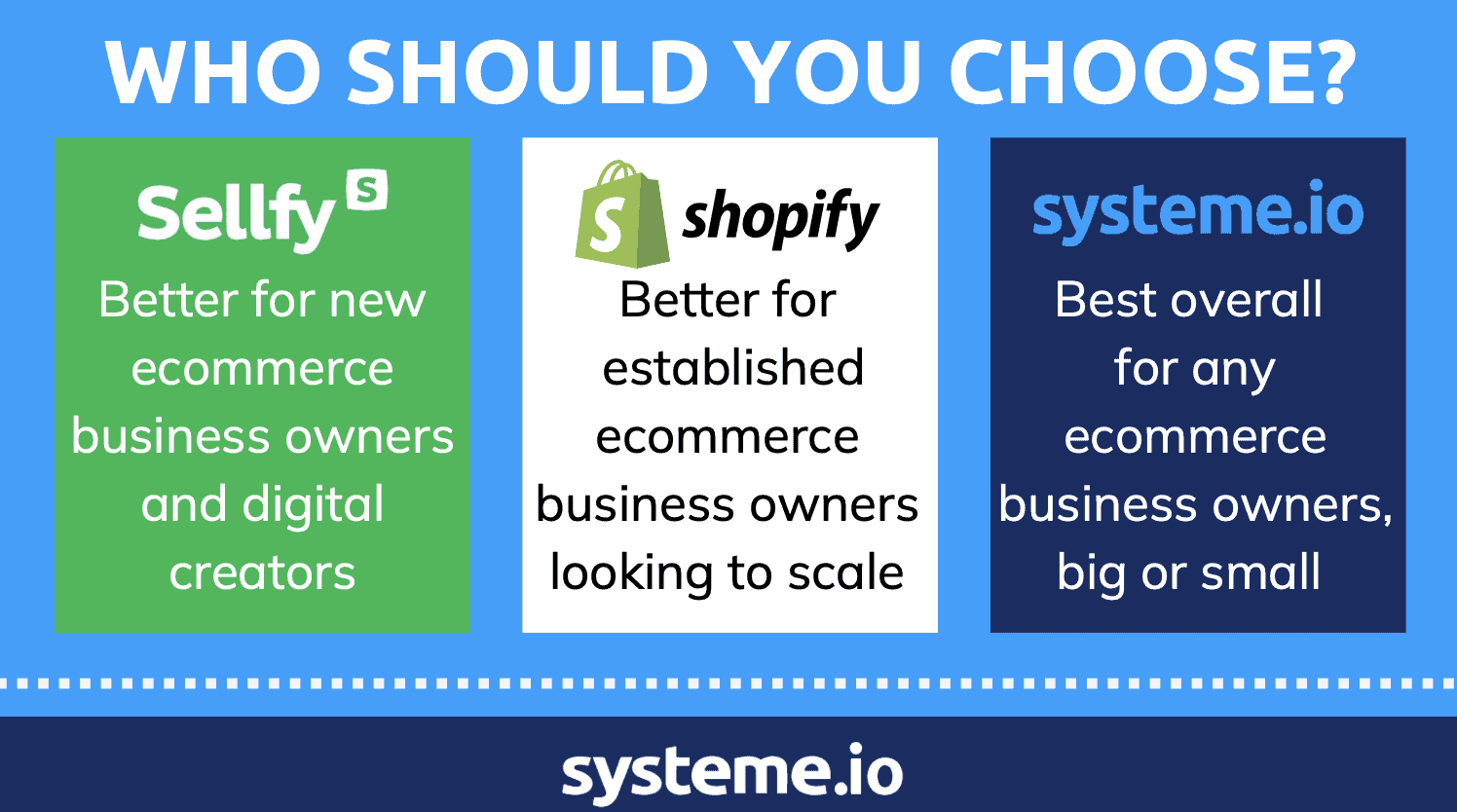
We’ve watched these ecommerce platforms duke it out, but it’s time to decide on the winner.
Sellfy is the better option for newbie ecommerce business owners.
With their Free Forever plan, customization options, and powerful reporting, they’re just enough to get you started.
If you’re established and looking to grow fast, Shopify is more likely to suit you.
Things like inventory management, Shopify shipping, and abandoned checkout recovery are worth the price tag if you can afford them.
However, if you’re looking to partner with software that works for ecommerce businesses big and small, look no further than systeme.io!
You’ll get all of the features you need to make online sales and market your entire business without the need for web development skills of your own.
Sign up for free today — no credit card or payment details are necessary.
Other posts about ecommerce:


© systeme.io. All rights reserved
© systeme.io. All rights reserved