
Podia vs. Kajabi: Which Platform is Better for Your Online Business?
Building a course requires a platform that will enable you to create and launch your course with easeand functionality.
In fact, online learning has grown widely popular in recent years. In the U.S alone, there were over 17 million people enrolled in e-learning.
Both Podia and Kajabi provide you with the tools you need to launch an online business. But which one is better for your business?
To help you decide, let’s take a comprehensive look at their features, pricing plans, and more.
Let’s get started!
1. What is Podia?
Podia logo
Podia is an online course platform created in 2014 by founder and CEO, Spencer Fry.
They are mainly known as course creator software and their core principles include putting creators first and treating everyone equally.
Aside from selling online courses, you can also:
Sell digital downloads
Market your products using affiliates
Launch email marketing campaigns
Create webinars (free and paid)
2. What is Kajabi?
Kajabi logo
Kajabi was created to help their customers launch successful online businesses without technology as a barrier.
Like Podia, Kajabi is an all-in-one platform.
Travis Rosser and Kenny Rueter started Kajabi in 2010. Kajabi was featured on Inc’s 5,000 fastest-growing SaaS companies, and they refer to their digital marketing customers as “Kajabi heroes”.
3. The pros and cons of Podia and Kajabi
Many online tools or software have strengths and weaknesses.
Highlighted in the tables below are the pros and cons of both Podia and Kajabi.
Let’s start with Podia:
Pros

Excellent customer support (live chat and 24/7 email support)
Affordable
Unlimited courses, downloads, webinars with all their pricing plans
Easy-to-use as no tech knowledge is required
14-day free trial and no credit card details required

Cons
Basic customization
Course builder provides no option for cloud importation
Lacks a sales funnel builder
Provides basic reporting and analytics
Has no mobile app
Now let’s look at Kajabi’s pros and cons:
Pros
Excellent customer support (live chat and 24/7 email support
User-friendly
14-day free trial
Easy to manage
Customizable themes
Cons
Unaffordable for small businesses
Has no free plan
Needs third-party apps (Accredible and Zapier) to generate course completion certificates
Limited features with their Basic plan
Card information is required to start
Now let’s see how you can create a course with both the online course platforms.
4. Podia vs. Kajabi: Comparing the main features
4.1. Online course creation
To create an online course that will benefit your students, you need a course creator that will allow you to:
Upload content easily
Ensure a smooth learning process
Provide detailed reports
4.1.1. Podia’s online courses
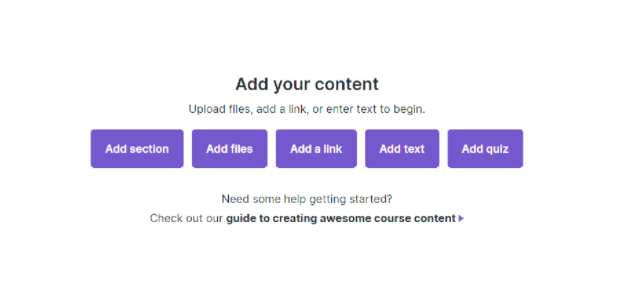
Podia’s visual editor
Podia has a built-in course creation tool that is user-friendly.
Some benefits of creating course content on Podia are:
Unlimited courses
Limitless file storage or bandwidth
Unlimited video hosting (Podia uses Wistia)
Unlimited students
To start with the course creation process on Podia, you have to choose "Online course" as the type of product you wish to create.
Afterward, you’ll develop sections where you can add your content.
It’s important to note that with Podia, you’ll have to build your course from scratch because they lack done-for-you templates.
Even though Podia doesn’t offer much in terms of visual design, you cancreate your course sections with ease and with no coding experience.
You can upload files directly to your online course, such as:
Audio files
Video files
PDFs
Text
And more.
However, you can’t upload files from cloud storage like Google Drive or OneDrive.
Once you’ve uploaded your files, they’ll automatically be turned into lessons or tutorials that your students can access.
For easy course navigation, there’s a table of contents on the left side of the course player.
One major drawback is that you can’t use different types of content (i.e. video, text) in one lesson — you’d have to create a separate lesson.
On the upside, you can set your course content to drip to your learners section-by-section or give them full access.
Additionally, Podia offers course completion certificates on-site once a student completes a course.
Now let’s see how Kajabi fares in the online course creation process.
4.1.2. Kajabi’s online courses
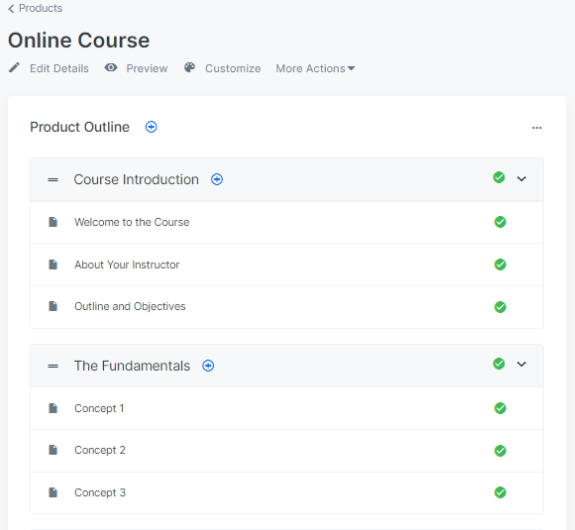
Kajabi’s online course blueprint
Creating courses with Kajabi’s online course builder works a little differently from Podia.
This is mainly because they provide you with fully customizable course blueprints.
You can choose one of their customizable themes or start from scratch using a blank blueprint.
Aside from course blueprints, Kajabi offers templates for other digital products likecoaching programs and membership sites.
Like Podia, you can upload files such as audio, text, etc. directly to Kajabi and add course content to create your lessons under each section.
These sections have blocks that enable you to organize your content.
Unlike Podia, Kajabi allows cloud importation of your files from GoogleDrive and Dropbox. They also use Wistia as their video partner.
The menu on the left side of the page allows you to edit any element to suit your preferences.
Like Podia, you can set your course content to drip for a given period.
In addition to drip content, you can lock your content or give students all the resources at once.
At a glance, it seems as though Kajabi has more to offer with their course builder, but if you’re keen on creating multiple courses to sell online, Podia would be a better fit.
4.2. Student assessment
Student assessments provide benefits to both students and teachers.
Some of these benefits are:
To ensure learners meet course objectives
To motivate students to do better
To give insight into how effective the course is
4.2.1. Podia’s assessments
Podia doesn’t offer much with regards to student assessment — they only provide multiple-choice quizzes.
You can set up as many questions as you’d like, but you can’t include other question types in their quizzes, such as open-ended questions or questions that involve images.
This may limit your ability to evaluate student performance.
When students take the quizzes, they can view their results and opt to retake the test before moving on to the next lesson.
On the upside, teachers can track their learners' progress under each student’s profile, see all their test scores and how many lessons they’ve taken so far.
Lastly, Podia has in-app messaging where students can communicate with their teacher in real-time and leave comments on lessons:
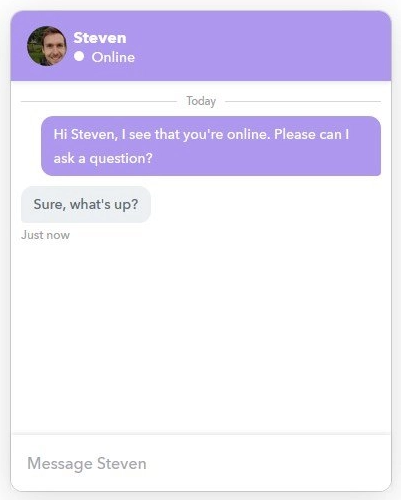
Podia’s messaging
4.2.2. Kajabi’s assessments
Kajabi offers different ways through which you can conduct student assessments.
Unlike Podia, you can add open-ended questions to your lessons aside from multiple-choice quizzes.
Another great feature is that learners can upload files when doing assignments, that you can check.
Quizzes and assignments aside, Kajabi offers in-depth reports about students throughout your course.
Kajabi’s overview reports allow you to track students’ lesson progress and view the number of students that have started or completed a particular lesson.
With students’ progress reports, you can analyze and adjust your course where necessary and also stay up-to-date with students’ performance.
This in turn will enhance their overall experience with your course.
When it comes to student assessments, Kajabi wins because they offer a more comprehensive way of assessing your students compared to Podia.
4.3. Email marketing
Email marketing is undoubtedly a powerful way to market and sell your products.
For example, you can send out an email prior to launching a new course with an incentive to encourage conversions.
Let’s see how you can create marketing emails or an email marketing campaign on Podia and Kajabi.
4.3.1. Podia’s email marketing
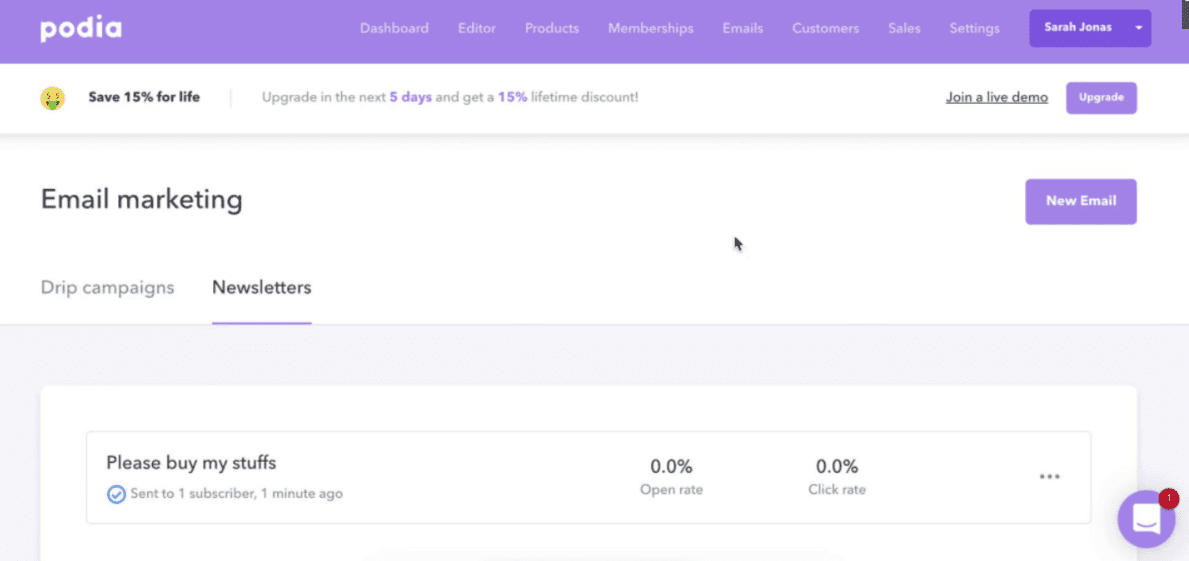
Podia’s email marketing
You can easily launch your email marketing campaign on Podia.
However, their text formatting is basic, and they lack prebuilt email templates.
The good news is in addition to creating a new list, you can import existing email contacts to their platform for free.
Here’s what else you can do with Podia’s email marketing capabilities:
Set entry and exit conditions for your email marketing campaigns
Send unlimited emails to your contacts
Set up basic automation rules and preview emails before sending them out
Segment your contacts list based on how the lead opted into your list and their individual goals
Podia lacks a sales funnel builder to help you capture leads and push them to convert.
Nevertheless, they do allow you to create landing pages, though they lack preset landing page templates.
If you want access to more advanced email marketing features, consider using third-party apps since Podia also doesn't offer advanced email marketing features.
4.3.2. Kajabi’s email marketing

Kajabi’s email newsletter template
Like Podia, Kajabi has built-in email marketing software where you can run email campaigns.
Kajabi allows you to integrate your marketing campaignswith every aspect of your online store or business.
Here’s what you can primarily do with Kajabi’s email marketing:
Create high converting landing pages and opt-in forms for email collection — They boast a selection of pre-made landing page templates
Set up advanced email sequences for your business
Create custom segments for your contacts in targeted email campaigns
Send out email broadcasts and email newsletters
Set up email drip campaigns for your audience
As you can see from the above list, Kajabi offers a lot regarding your marketing strategy.
There’s no limit to what you can do, from custom segmentation to automated email campaigns.
For example, if you’ve been sending email drip campaigns to a segmented group of subscribers, you’ll know what action to take next to get the lead to convert.
This is because Kajabi allows you to:
Add countdown timers to your emails
Integrate your sales funnel (Pipelines) with your marketing emails
Have access to email analytics or reporting tools
Kajabi offers better email marketing features than Podia, as they have more advanced options.
With Podia, you may have to use third-party integrations, causing you to dig deeper into your pocket.
Kajabi wins this round without a sweat.
4.4. Affiliate programs
An affiliate program can help you sell your online courses, grow your customer base, and more.
According to Statista, the affiliate marketing spend in the US is expected to reach $8.2 billion in 2022.
Both Podia and Kajabi have an affiliate program. Let’s see what they have to offer.
4.4.1. Podia’s affiliate program
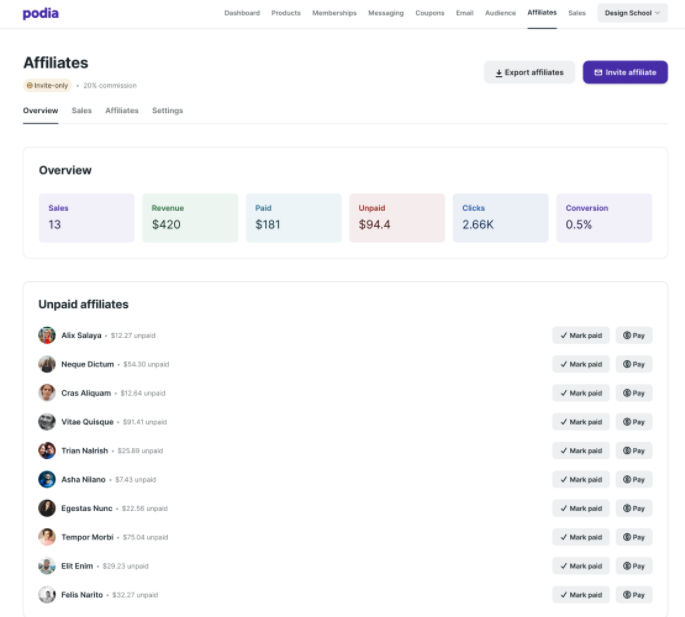
Podia’s affiliate dashboard
Much like creating an online course and setting up an email campaign, launching an affiliate program is straightforward with Podia.
Podia’s affiliate program works by letting you turn your customers into your affiliates. They’ll need to have a PayPal account to join, though.
These affiliates have access to an affiliate dashboard where they can get their affiliate links and track their sales and commissions.
Here’s what else you can do with Podia’s affiliate program:
Set up affiliate commissions for any product as a percentage or fixed amount
Manage affiliate payments ensuring fast and seamless payouts
Set custom commission amounts in your program
Access affiliate analytics on the dashboard such as sales and clicks
Create affiliate links for all of your products
Easily communicate with your affiliates via email
Since there’s no limit to how many products you can promote on Podia,affiliate marketing can only add to your bottom line.
One significant drawbackis that you can only have an affiliate program in Podia’s Shaker and Earthquaker plans, not their cheaper basic plan (Mover).
Podia uses cookies to track affiliate purchases. After 15 days the tracking stops.
Your affiliates can be paid through PayPal on-site or externally through an alternative payment system.
They also have an affiliate program called Refer-a-Creator,where they pay you a 30% commission each month for every prospect you convert into a paying customer.
4.4.2. Kajabi’s affiliate program

Kajabi’s affiliate dashboard
Even though Kajabi is not known as one of the best affiliate marketing tools in the market, their program has a lot to offer.
They allow you to have an unlimited number of affiliates promoting your products or offers.
More importantly, your affiliates don’t have to be members of your site.
Aside from having an unlimited number of affiliates, their affiliate program helps you to:
Get in-depth affiliate reports
Track affiliate sales or conversions
Enable or disable new affiliate registrations
Create your commission percentage to manage payouts
Communicate easily with your affiliates via email using Affiliate Announcement
Kajabi’s affiliate program uses cookies and Share Links to ensure accurate crediting of affiliate commissions.
You can generate Share Links to give to your affiliates through the affiliate dashboard.
Share Links enable cookies to be stored on a potential buyer’s browser for 30 days.
An affiliate is only credited if a user purchases the product within 30 days and doesn’t use a different device or browser to buy a product.
Like Podia, Kajabi not only allows you to create your affiliate program but also to become one of their affiliates (Kajabi Partner).
You’ll get a 30% lifetime commission for any new referral.
When it comes to affiliate marketing both Podia and Kajabi are on par with each other since they have a lot to offer.
It's a tie.
4.5. Websites
A website is a powerful marketing medium. Website design can easily influence whether users stay on your site or look for an alternative website.
Both Podia and Kajabi allow you to build an entire website directly on their platforms.
Below, you’ll learn about their website builders in detail.
4.5.1. Podia’s website builder
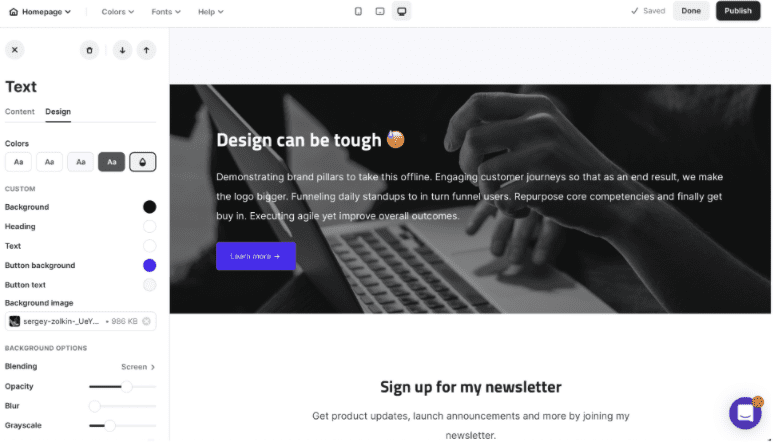
Podia’s editor
Podia’s website builder is pretty simple.
They don’t offer much in terms of web design save for a default theme or template that is simple but modern.
However, you can set and edit colors for your background, headings, and fonts.
The best part is that all of Podia’s plans come with a custom website.
You can create as many sales pages (product pages) as you’d like on Podia, in addition to custom pageslike:
About pages
Author’s bio pages
Contact pages
And more.
You can add videos, images, and social media links to your site,create landing pages for lead capture and add client testimonials.
When you think of a website, the next thing that comes to mind is a blog— unfortunately, Podia doesn’t have blogging software.
4.5.2. Kajabi’s website builder
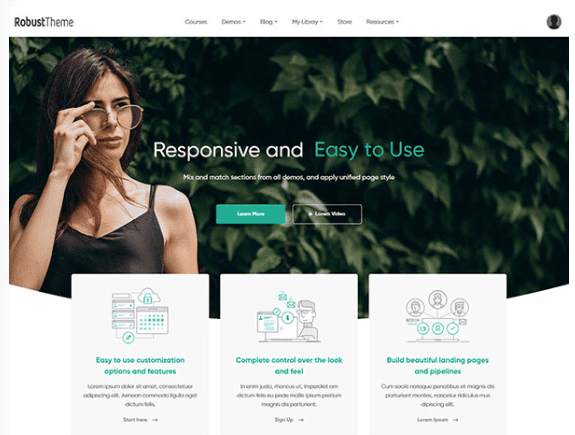
One of Kajabi’s website themes
Kajabi’s website builder allows you to create and design your website with ease using advanced design tools.
They boast a range of customizable website templates that you can use to design a professional-looking website.
Once you’ve chosen a theme or layout, you can edit any web page element to suit your needs and reflect your branding —consistent branding can help you sell your products.
Like Podia, you can create your about page, sales page, opt-in pages or landing pages in the shortest time possible.
Kajabi’s website builder is mobile responsive and also allows you to include alt-text in your images.
This can help increase your site’s rankings in Google’s SERPs (search engine results pages).
Unlike Podia, you can create a blog on Kajabi and use it to educate existing and potential customers — giving Kajabi the win.
5. Extra features
Now that you understand Kajabi and Podia’s main features, let’s look at some extra features they offer.
5.1. Podia’s extra features
Podia has other features that make running an online store more effective and enjoyable.
These features include:
Third-party integrations — Podia allows integrations with tools like ActiveCampaign, Facebook Pixel, and Google Analytics
Communities — You can build a community on Podia where your members can discuss various topics and access your content
Automated webinars — Podia allows you to offer free or paid webinars to users using YouTube Live or Zoom integrations
Stripe and PayPal payment — Podia enables you to set up both Stripe and PayPal payment systems
5.2. Kajabi’s extra features
Like Podia, Kajabi has extra features that further convey to users that they’re an all-in-one platform for online businesses:
Kajabi University — Kajabi offers free video tutorials so that subscribers can learn everything they need to know to help them use the platform
Third-party apps — Kajabi allows integrations with tools like Zapier, Google Analytics, and Facebook
Webinars and events — Kajabi allows you to create free webinars and host live events to help build brand awareness
Stripe and PayPal — Kajabi allows you to set up both Stripe and PayPal payment systems
Mobile application — Kajabi has a mobile app on Android, and iOS
Membership site — Kajabi allows you to build a membership program where you can add content to a preset blueprint
Although both platforms offer powerful features, Kajabi's mobile app puts them one step ahead, making them the winner in this section.
Let’s find out how much it will cost you to sign up for Podia and Kajabi’s plans.
6. Pricing
6.1. Podia’s pricing
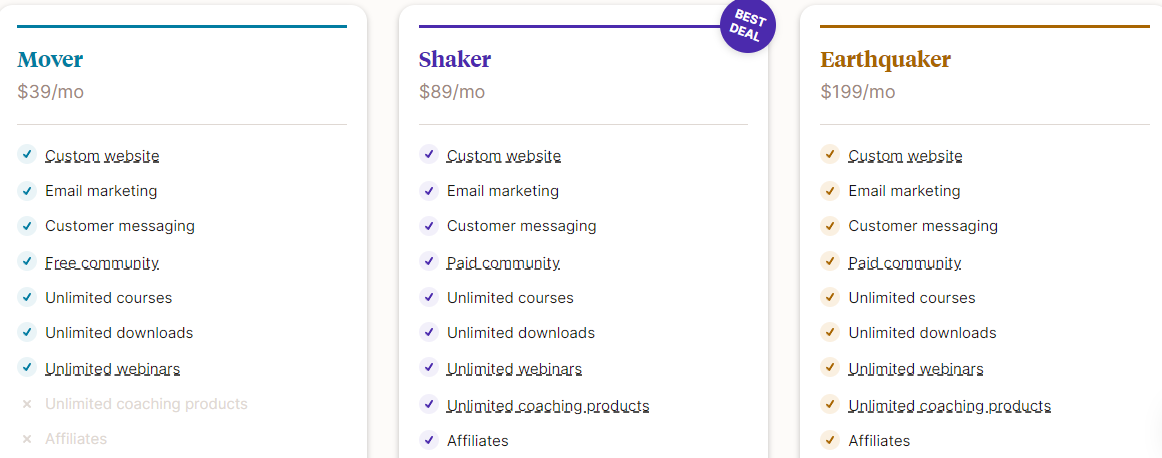
Podia’s pricing plans
To start using Podia, you can either sign up for one of their 3 pricing plans or start a 14-day free trial that requires no credit card details.
During the 14 day trial period, you can cancel at any time. The free trial comes with all the features of their Shaker plan.
If you choose one of their 3 plans, you can pay monthly or yearly, and there are zero transaction fees (with an annual payment plan, you’ll get to save 17%).
Podia also offers free migration of your customers and content if you opt for an annual payment plan.
At any point, if you’re unsure of which plan to choose, they offer a free walkthrough to help you decide.
Their 3 pricing plans are:
Mover — $39/month
Shaker — $89/month
Earthquaker — $199/month
Podia’s Mover plan has the following features:
Custom website
Email marketing
Customer messaging
Free community
Each plan offers more features as you scale up.
With all of Podia’s plans, you’ll get:
Unlimited downloads
Unlimited courses
Unlimited webinars
Unlimited email subscribers
6.2. Kajabi’s pricing
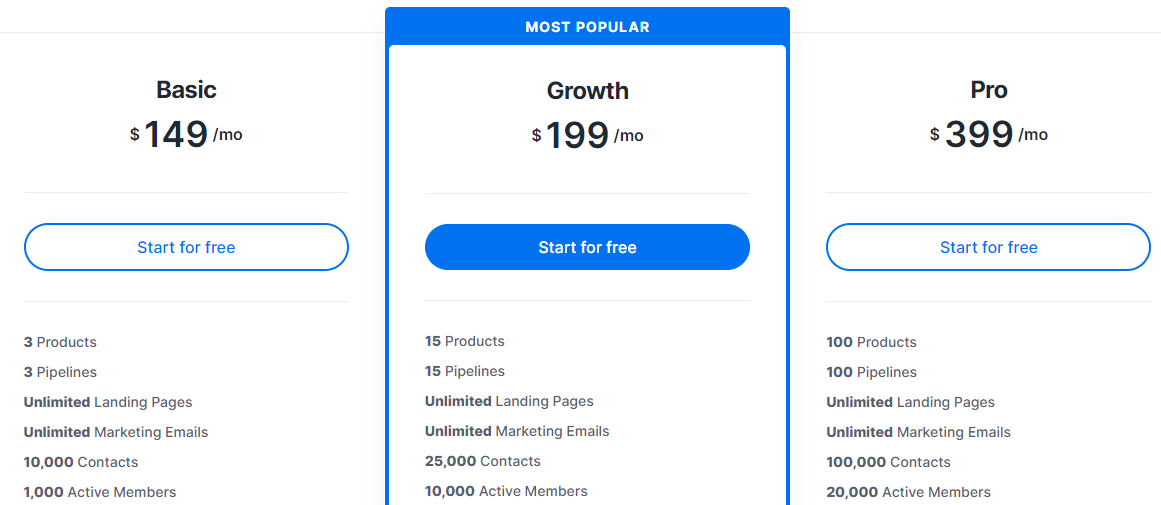
Kajabi’s pricing plans
Kajabi has a 14-day free trial for each of their plans.
They also provide a refund if you cancel your subscription before the completion of 30 days.
They have 3 pricing plans:
Basic — $149/month
Growth — $199/month
Pro — $399/month
When you opt for annual billing, you’ll save 20%, and they charge zero transaction fees with all their plans.
All of Kajabi’s pricing plans includeunlimited landing pages and marketing emails.
Here are the features you’ll find in their Basic plan:
3 products
3 Pipelines (sales funnels)
1 website
Space for up to 10,000 contacts and 1,000 active members
1 admin user
More features are included in their Growth and Pro plans, such as the ability to remove Kajabi’s branding and an affiliate program.
The Growth and Pro plans also give you access to advanced automation that you can use in your email campaign, offers, sales funnels, and forms.
Which platform is worth the money?
Depending on the needs of your business or business goals, it can go either way.
For starters, Kajabi only allows you to create 3 products with their Basic plan, whereas Podia allows you to create unlimited products.
Secondly, to launch an affiliate program on Kajabi, you’ll have to pay an extra $110/month compared to Podia’s affiliate scheme.
Lastly, to create your course and launch your entire online business on Podia, you’ll only part with $39, instead of paying $139 to do the same with Kajabi.
Podia is the clear winner here.
If you need even more, let’s consider another platform that’ll give you even more bang for your buck.
7. Systeme.io: The best alternative to Podia and Kajabi

systeme.io logo
Despite Podia and Kajabi having what it takes to help you build and run an online site, systeme.io is the best alternative to both platforms.
Why exactly?
With systeme.io, you can access all the features that Podia and Kajabi offer and so much more.
And the best part? You can start for free with our Free plan!
Speaking of features, let’s see what systeme.io has to offer.
7.1. Systeme.io’s features
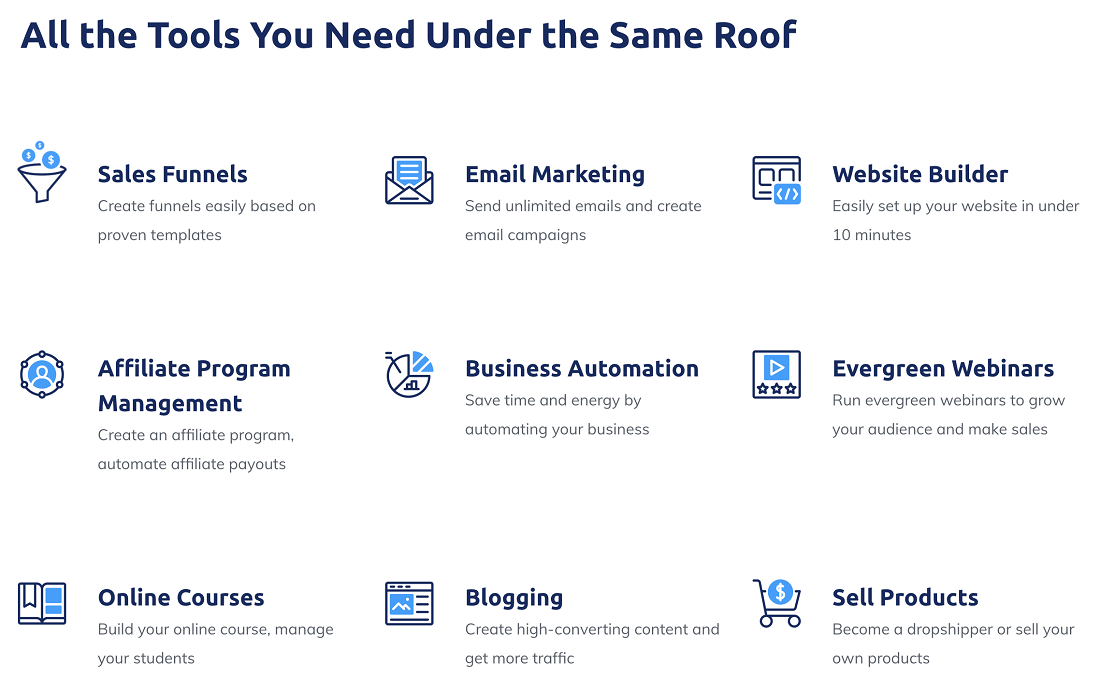
systeme.io’s features
Systeme.io is a true all-in-one platform that eliminates the need for third-party apps.
Our software is also fully integrated,ensuring the smooth day-day running of your online business.
Here are the featureswe have to offer:
Sales funnel builder — Build a funnel with ease depending on your business goals, whether it’s to sell products or build an email list
Website builder — Create a professional-looking website with high converting web pages using our drag-and-drop interface
Blog — Launch a blog to increase site traffic and conversions
Affiliate marketing — Create an affiliate program where affiliates can market your products, and you can publish your offers on our marketplace
Email marketing and automation — Launch an email campaign, set automation rules to eliminate manual tasks, and segment your contacts to send tailored emails
Online courses — Create and launch your online course with our easy-to-use course builder, and schedule drip content
Evergreen webinars — Create and run webinars on autopilot to help build your audience
And more!
7.2. Systeme.io’s pricing
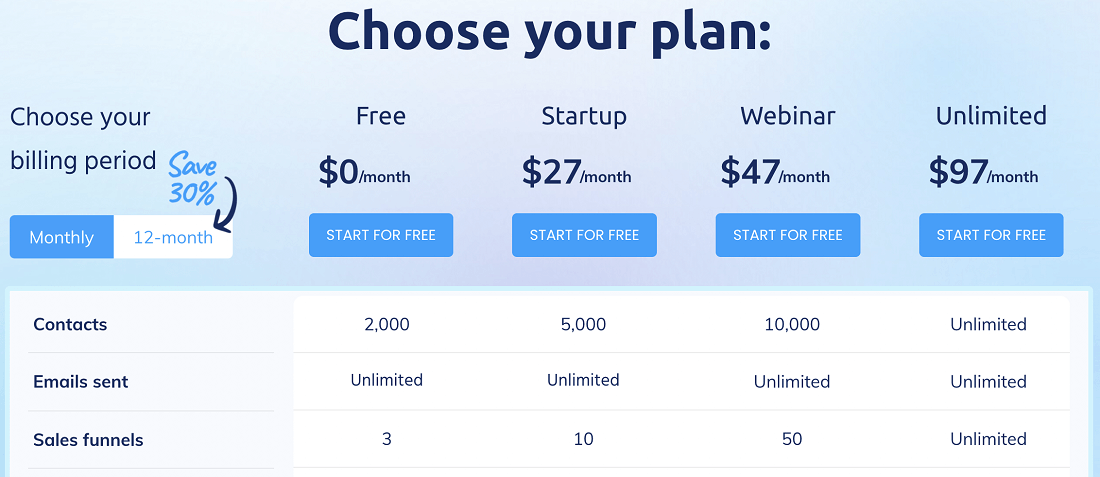
systeme.io’s pricing plans
In addition to our Free plan, we offer 3 paid plans:
Startup — $27/month
Webinar — $47/month
Unlimited — $97/month
With our Unlimited plan at $97, we offer unlimited everything providing you with all the features we mentioned earlier and more.
Another great thing about using systeme.io is that with all our plans (even the Free plan), you’ll get:
Unlimited file storage
Unlimited emails
Unlimited students
You’ll alsosave 30% if you opt for annual billing.
All in all, systeme.io provides you with better value for your money compared to Podia and Kajabi.
Launch your entire online business quickly and effectively without paying a single cent!
8. Conclusion
Now that we’ve seen what Podia and Kajabi have to offer, which one should you choose?
If you’re a startup or on a tight budget but still need a reliable platform to run your online business, you should choose Podia.
If you want access to more features and don’t mind the above-average pricing, you should choose Kajabi.
But there’s an even better solution to align yourself with.
Systeme.io!
Choose this fully integrated platform that's affordable, user-friendly, and provides all the tools you need to become an online success story.
Sign up for ourFree plantoday!
Other posts about online course builders:


© systeme.io. All rights reserved
© systeme.io. All rights reserved