
MailerLite vs. ConvertKit: A Battle for the Best Email Marketing Tool
When you’re serious about connecting with your audience to grow your online business and increase sales, you need an email marketing tool that grows with you.
A good case in point is MailerLite or ConvertKit.
MailerLite is an email marketing automation tool that doubles up as a website builder, while ConvertKit is a full-fledged email service provider (ESP).
In this post, we’ll pit MailerLite against ConvertKit and compare their essential features, automation capabilities, and pricing options — to help you choose the right tool for your email marketing campaigns.
Ready for the epic MailerLite vs. ConvertKit showdown?
Let’s get started.
What is MailerLite?

MailerLite logo
MailerLite originally started as a web design agency in 2005.
Five years later (2010), co-founders Eimantas Norkunas and Ignas Rubežius revamped the agency into an email marketing software — MailerLite.
However, in April 2022, Vercom (a cloud communication platform) acquired MailerLite for an estimated $90 million.
This explains why the company announced a new version of MailerLite earlier this month.
Vercom promises to help MailerLite gain a more global footprint and hopefully compete with Sinch and Twilio — companies focused on building winning experiences across SMS, video, and voice channels.
With MailerLite’s advanced feature-set, you can:
Create engaging and responsive email campaigns
Monetize your audience by integrating with tools like Shopify
Build advanced marketing workflow automations
Run targeted campaigns with personalized content
Manage and segment your email list
If you’re looking for an email marketing automation tool that grows your audience and drives revenue, MailerLite comes in handy.
Read on to learn more about Convertkit — one of the biggest names in the email marketing automation game.
What is ConvertKit?

ConvertKit logo
Founded in 2013, ConvertKit is the original brainchild of Nathan Barry.
He created the popular email marketing platform as a way to better reach his audience — through email — to sell ebooks and online courses.
Unlike MailerLite, ConvertKit focuses more on solving the needs of one type of target audience — online creators (think YouTubers, podcasters, coaches, musicians, and authors).
Compared to many generic email marketing automation tools built on previous design trends and technology, the ConvertKit platform is designed for modern-day use.
With ConverKit’s feature-set, you can:
Grow your audience by collecting email addresses using link pages, sign-up forms, and landing pages
Design visual automations to view your entire marketing funnel
Create lasting connections and promote your online business with sales funnels and a drag-and-drop email editor
Sell digital products and subscriptions without mastering tech skills
If you're an online creator and want to connect with your subscribers (by sending them the right content at the right time), ConvertKit is for you.
Can years of experience make you choose MailerLite?
Or do you prefer the newer option, ConvertKit?
Keep reading to see the strengths and weaknesses of both platforms.
MailerLite vs. ConvertKit — Pros and Cons
While both tools are great at what they do, they fail in some areas.
In this section, we've compiled a comprehensive list of MailerLite and ConvertKit’s pros and cons to help you choose the right tool for running successful email marketing campaigns.
MailerLite’s pros and cons
Here are MailerLite’s upsides and downsides based on real user reviews:
Pros

An easy-to-use platform
It has a free plan that grants you access to lots of features
Collects and stores valuable data
Responsive, round-the-clock support

Cons
Not ideal for email marketers with massive email subscriber lists
It can’t handle sophisticated email marketing campaigns
It takes time to load
Limits the number of webinars and courses you can create
ConvertKit’s pros and cons
Now, compare the good and the bad of MailerLite to see what these customersthink about the ConvertKit platform:
Pros
It’s a full-featured and user-friendly email marketing tool
Has a simple, easy-to-navigate user interface (UI)
Makes it easy to set up, track your content’s progress, and run email campaigns
Affordable pricing plans
Cons
Comes with expensive pricing options
Has multiple glitches in its free plan
Lacks forecasting and auto-fill capabilities
The platform has limited access to opt-in forms
Still undecided on which tool to choose?
Let's dive deep into the abyss of these 2 email marketing tools and discover their features.
But most importantly, what they can do for you.
MailerLite vs. ConvertKit — In-depth feature comparison
You can't rely on a few features to select the right tool for your campaigns.
That's why we've compiled an in-depth feature comparison to see what each platform can do for you, and how those features will ultimately benefit you as an online creator or when running an online business.
Email editor and templates
Stunning email designs, customization, and email content are essential in creating successful email campaigns.
So, ensure both platforms can offer exactly what you’re looking for.
Let’s begin with MailerLite and see what their email editor can do for you.
MailerLite’s email editor and templates

MailerLite’s rich-text editor
MailerLite allows you to create highly responsive and engaging email marketing campaigns using its 3 email builders:
Rich-text editor — Lets you add bullet points, images, and social media links to connect with your audience and enhance your messaging
Drag-and-drop editor — Comes with interactive blocks for creating engaging and converting email content
Custom HTML editor — Lets you build custom email campaigns
Besides having multiple email editors, MailerLite also lets you create emails quickly using a gallery of email templates.
With email templates, you don’t need a designer to help you deliver email content to your audience or for your business needs.
Compared to other email marketing tools (including its closest competitor, ConvertKit), MailerLite’s email templates have so much to offer.

MailerLite’s email templates
You can also insert (digital) products from your ecommerce store into your emails without leaving MailerLite’s email editor.
With MailerLite’s email marketing feature-set, you can:
Monetize your audience by integrating ecommerce platforms such as Stripe, WooCommerce, or Shopify
Automate email workflows using MailerLite’s automation builder
Send targeted email campaigns to every subscriber on your email list
Manage email subscribers and campaigns
Monitor campaign performances to discover what works best for you
Now, let's check out what ConvertKit’s email builder can do for you.
ConvertKit’s email editor and templates

MailerLite’s rich-text editor
Unlike MailerLite, ConvertKit email provider has a drag-and-drop email editor designed to create plain-text emails.
These emails perform better than those filled with videos, graphics, and complex code (in this case, we mean the easy-on-the-eye emails with a better chance of being read and responded to).
And they're more likely to end up in an inbox than in the spam folder.
To ensure emails land in your subscribers' inboxes, ConvertKit’s email editor lets you build simple yet high-converting emails.
ConvertKit’s email builder helps you achieve so much more:
Clean email formatting with no cluttered email menu bars
Add quick content in your emails including dividers, buttons, headers, personalization, etc
Add clickable (call-to-action) CTA buttons in your emails
Upload images instantly thanks to a direct integration with Unsplash
Customize a specific part of your email content using an HTML box
Besides having an intuitive email builder, ConvertKit gives you the freedom to create as many email templates as you need.

ConvertKit’s email templates
The best part?
ConvertKit’s email templates are all mobile-responsive, keeping your content looking good on every screen.
All in all, in terms of email design and templates, MailerLite wins.
It has more email templates and more customization options.
For this reason, our scoreline starts at MailerLite: 1 - ConvertKit: 0
Automation
In the world of email marketing, “marketing automation” is a buzz phrase that captures the attention of online business owners.
Both MailerLite and ConvertKit have great email automation functionalities, but which of these 2 tools tops the table?
MailerLite’s automation

MailerLite’s email automation
MailerLite’s drag-and-drop email automation builder lets you move customers through your marketing funnel without lifting a finger — from the welcome email to purchasing your products.
With MailerLite’s email automation workflows, you can:
Instantly react to your subscribers' behaviors (without human effort), and automatically send emails based on multiple triggers and events
Nurture and retain your valuable customers with perfectly timed emails using ecommerce integrations
Engage your subscribers (whether individually or as a group) by segmenting them into interest groups based on their behavior
Track your audience’s growth, metrics, and engagement
Overall, MailerLite’s email automation builder is simple and easy to use.
If you want to create advanced (or complicated) automation workflows, you’ll find MailerLite a little limited on that front.
In essence, the MailerLite platform doesn’t go beyond the basics when it comes to email automation.
Does ConvertKit offer superior email automation functionality?
Let’s find out.
ConvertKit’s automation

ConvertKit’s visual automation builder
ConvertKit’s automation builder is a different cup of coffee.
It uses visualized automations to help you send targeted email content to your subscribers while you focus on scaling your online business.
However, like MailerLite, ConvertKit’s email automation tool is simple and easy to use, with its workflows based upon 3 key factors:
Conditions and split paths — Conditions ask subscribers “yes” or “no” questions, and take them to a specific path based on their answers
Actions — Actions connect forms to email sequences and tag subscribers when they opt-in your email list
Events — Events push subscribers to a specific date, specifically when a tag is added or someone buys a product
With ConvertKit’s visual automation tool, you can:
Segment your subscribers based on their journey
Send targeted email content to a specific list at a set time
Build email automation sales funnels
Customize a subscriber’s journey based on their interactions with your business
Also, ConvertKit’s visual automation feature lets you sell online services, host webinars, launch digital products, and survey your subscribers.
In terms of automation, neither MailerLite nor ConvertKit offer complicated email automation tools — they get the job done pretty well.
However, ConvertKit has an upper edge over its counterpart because it lets you build emails without leaving its automation builder, streamlining the entire design process.
Scores now stand at MailerLite: 1 - ConvertKit: 1
Landing pages and forms
Not happy with your conversion rates?
Optimize your landing pages.
They’ll increase conversions as they target a specific audience.
Both MailerLite and ConvertKit come with great landing page builders, but which one outshines the other?
MailerLite’s landing pages and forms

MailerLIte’s landing page builder
MailerLite’s drag-and-drop landing page builder lets you design custom landing pages from scratch.
Like its email editor, you select the elements you fancy, drag them into place, and edit them as you please.
MailerLite lets you directly sell subscriptions and digital products within its landing pages, thanks to Stripe’s integration with the platform.
But the landing page editor has some drawbacks — it gets a little clunky, has limited customizations, and you can only drag certain elements to certain areas.
MailerLite also has a library of responsive landing page templates, with multiple themes including featured services, coming soon, webinars, and blog promotion pages.
With MailerLite landing pages, you can create different content blocks:
Opt-in forms
Customer feedback surveys
Testimonials
Countdown timers (not available on ConvertKit)
Marketing videos
Testimonials
Does ConverKit also offer responsive landing page templates and forms?
ConvertKit’s landing pages and forms

ConvertKit’s landing page builder
ConvertKit’s landing page builder has a shallow learning curve — anyone can easily adjust its settings for more in-depth customization.
Ultimately, ConverKit gives you more freedom than MailerLite does in terms of customization.
For example, you can choose the exact color you’d like for your fonts and backgrounds using ConvertKit’s color picker (a feature MailerLite lacks).
Creating landing pages on ConvertKit is equally a breeze thanks to its many responsive and customizable landing page templates.

ConvertKit’s landing page templates
ConvertKit has a great selection of templates to choose from, including:
Lead magnets
Book releases
Coming soon
Course sign-ups
Sales
While both email tools have similar landing page customizations, ConverKit takes the cake when it comes to landing pages and templates.
Scores: MailerLite: 1 - ConvertKit: 2
Reporting and analytics
To seriously understand how well your email marketing campaigns are doing, you need to track your data.
Both email marketing tools come with reporting and analytics features, but which one measures success better?
Let’s take a closer look.
MailerLite’s reporting and analytics

MailerLite’s analytics dashboard
MailerLite lets you track and measure all your email campaign activity and subscriber engagement — from form signups and page conversions, to best-performing automations and email open rates.
MailerLite’s email reports and analytics dashboard include data covering the following areas:
Opened emails
Clicked emails
Click to open rate
Unsubscribes
Bounces
Spam complaints
It’s easy to use and won’t overwhelm you if you’re using analytics tools like this for the first time.
With this feature, you can track and analyze everything you build, send, and publish in MailerLite, as well as any other metrics you think are important for measuring success.
Can ConvertKit do better than its counterpart?
ConvertKit’s reporting and analytics

MailerLite’s analytics dashboard
You’ll notice ConverKit’s analytics dashboard bears a resemblance to MailerLite’s in terms of simplicity and ease of accessing data.
ConvertKit’s dashboard also lets you see how your email list is growing and how subscribers are interacting with the emails you send.
It generates several reports on the growth of your campaigns:
Email sequence reports
Email broadcast (email campaigns) reports
Email deliverability report (a Creator pro feature)
Where email reporting and analytics are concerned, MailerLite comes out on top.
It details information about readers engaged in your email campaigns.
Also, MailerLite’s split testing functionality lets you test your email content and sender name.
While ConvertKit only lets you test your email’s subject line.
Scores: MailerLite: 2 - ConvertKit: 2
Integrations
Besides collecting data on your email campaigns, make sure to expand your reach by seamlessly integrating the tools you use for your online business.
By integrating with popular web services, can MailerLite and ConvertKit make your online business (or your work as a creator) run more smoothly?
Let’s find out!
MailerLite’s integrations

MailerLite’s integrations
MailerLite has more than 125 native integrations, and they cover a range of categories, including (but not limited to):
Project management
Landing pages
Automation
Tools and reports
Pop-ups
Referrals, memberships, and gift cards
MailerLite also isn’t short of website platforms you can integrate with.
Some notable names include WordPress, Squarespace, WooCommerce, and Shopify — not to forget Zapier integration, which allows you to connect to hundreds of other third-party applications.
By having a developer API, MailerLite also lets you create custom integrations.
Does ConvertKit boast a similar feature?
ConvertKit’s integrations

ConverKit’s integrations
ConvertKit also comes with multiple integrations—over 107 and counting, covering a wide host of categories, including the following:
Website platforms
Membership sites and courses
Ecommerce
Lead capture
Customer relationship management (CRM) (it's a user-friendly CRM platform)
Like its counterpart, ConvertKit also has a Zapier integration.
So, it’s possible to connect to multiple apps.
Plus, you have the benefit of using ConvertKit’s developer API to build custom integrations.
MailerLite narrowly wins this round because it has more native integrations than ConvertKit.
However, both email marketing tools boast a wide range of solid apps, which Zapier can expand upon.
Scores: MailerLite: 3 - ConvertKit: 2
Extra features
As your business evolves, you’ll need more features that go beyond email marketing but also work together to enhance your needs.
Here’s a quick comparison table of bonus features offered by both tools:

These features matter a great deal depending on your email marketing's unique needs, so this one is a stalemate.
Here’s our final score sheet tally: MailerLite: 4 - ConvertKit: 3
Pricing
MailerLite’s pricing

MailerLite’s pricing plan
MailerLite comes with 4 pricing plans:
Free plan — $0/month for sending 12,000 emails to 1,000 subscribers, and access a drag-and-drop editor and 10 landing pages
Growing business plan — $17/month for sending unlimited emails to 2,500 subscribers, and get unlimited templates, blogs, and websites
Advanced plan — $30/month for sending unlimited emails to 2,500 subscribers and enhanced automation feature
Enterprise plan — (contact sales team for pricing)
MailerLite, compared to many other email marketing platforms (including ConvertKit), comes across as a more affordable option.
However, you need to consider the following before choosing this platform:
MailerLite’s free plan isn’t entirely free and it limits you to sending only 12,000 emails a month
You’ll need to part with $1,764 annually to manage up to 50,000 contacts, (you can pay less with other email automation platforms)
You need to pay up to $17/month to remove MailerLite’s branding on the landing page and email templates
If this isn’t worth your while, keep reading to see how ConvertKit compares.
ConvertKit’s pricing
ConvertKit has 3 pricing options:

ConvertKit’s pricing plan
Free plan — $0/month for sending email campaigns to a maximum of 1,000 subscribers and building unlimited landing pages and forms
Creator plan — $49/month for sending email campaigns to up to 3000 subscribers and creating automated funnels and sequences
Creator Pro plan — $79/month for sending email campaigns to 3,000 subscribers and sell digital products and subscriptions
ConvertKit’s pricing model depends on the size of your email list.
So, it lets you pay for only what you need.
You can test-drive ConvertKit’s features for 14 days, and there's no credit card required to sign up for a free account.
Before you subscribe to this platform, consider the following:
If you want to grow your email list past 1,000 subscribers, you'll need to add your credit card details and upgrade to the Creator plan.
ConvertKit free plan isn't really free forever, and you can only send emails to less than 1,000 subscribers
You’ll need to pay up to $697/month to send unlimited emails to 100,000 email subscribers
So really, it’s up to you to choose a platform with an affordable pricing option to help you get started with building an audience.
If you want to make a more informed decision, read on to know which platform you should go for and why.
MailerLite vs. ConvertKit — Which email marketing platform should you go for?
MialerLite and ConvertKit are both robust email marketing services for online businesses and creators — so how do you choose which tool to use?
Here’s a quick overview of how MailerLite compares with ConvertKit:

The question still remains — which email marketing tool is ideal for sending successful email campaigns?
Whatever your choice, no platform comes close (in terms of features and email marketing capabilities) to systeme.io!
Systeme.io — The best email marketing tool

syteme.io logo
While MailerLite and ConvertKit exude formidable dominance as email marketing providers, they’re still not the end-all, be-all for running every aspect of your email marketing campaigns.
Systeme.io is an email marketing powerhouse that lets you send unlimited emails and equally set up unlimited email marketing campaigns.
With our email marketing features, you can do the following:
Track each email campaign with real-time analytics and statistics
Create newsletters and schedule them using text or visual options
Build automated email sequences and link them to your funnels
Segment your email subscriber list using contact tagging features
Send unlimited emails to your audience
Additionally, our all-in-one platform lets you access a rich feature-set without the clunky integrations present in MailerLite and ConvertKit:
Blog building solutions for a great content marketing strategy
Membership sites and online courses
Workflows and business automation
Website building and sales funnels
Ecommerce features to help you sell digital and physical products, as well as online services.
With all these functionalities, you’d expect to pay more than what MailerLite and ConvertKit sets you back — not with our platform!
Systeme.io’s pricing
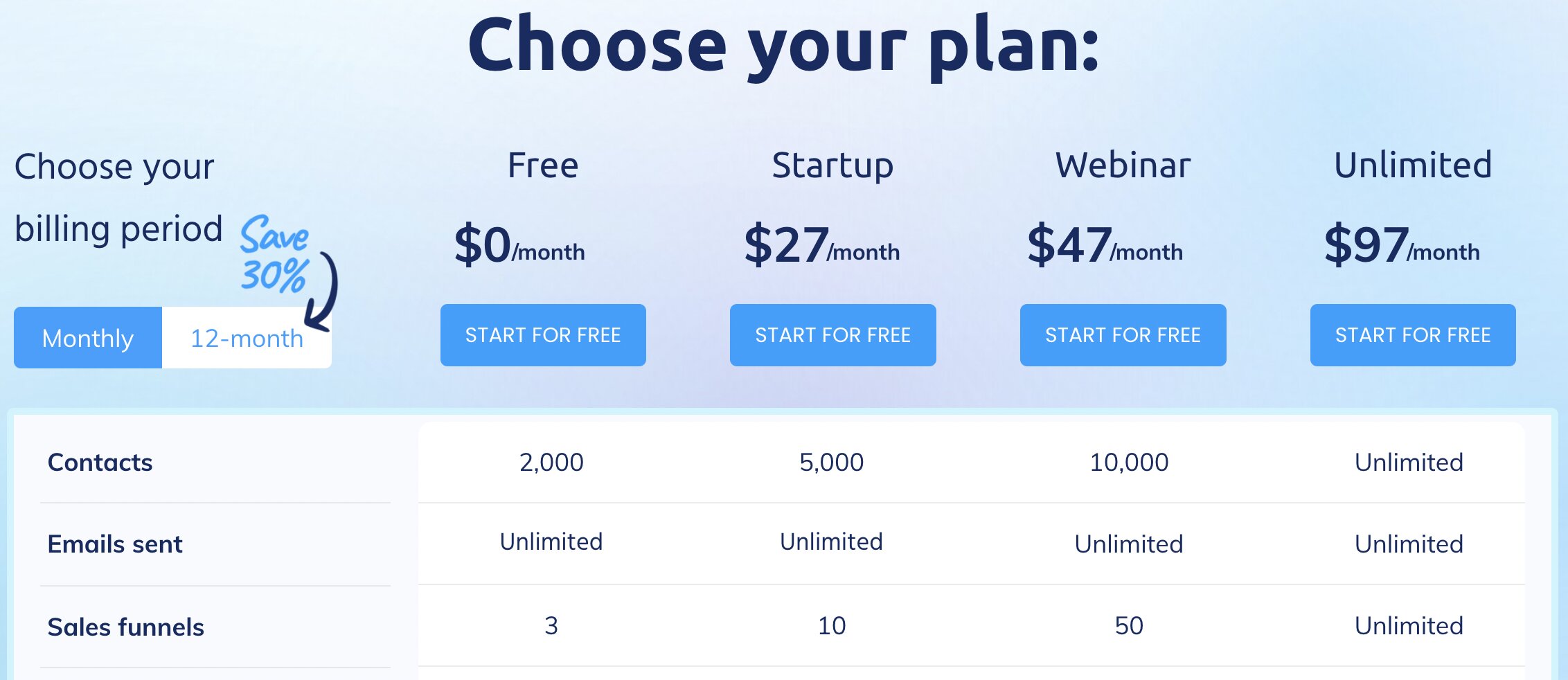
systeme.io pricing plans
Systeme.io comes with 4 pricing options that boast a variety of features:
Free plan — $0/month for sending unlimited emails to 2,000 subscribers, 1 email campaign, and creating 3 sales funnels
Startup plan — $27/month for sending unlimited emails to 5,000 subscribers, creating unlimited blog posts, and 10 email campaigns
Webinar plan — $47/month for sending unlimited emails to 10,000 subscribers, access 20 workflows, and 100 automation rules
Unlimited plan — $97/month for sending unlimited emails to an unlimited number of subscribers, create unlimited blog posts and provide everything unlimited our platform can offer
Irrespective of the pricing option you choose, they all come with the standard systeme.io features, which help you run a successful email marketing campaign—including unlimited emailing!
Still not sure whether our platform is a perfect fit for you?
You can use our Free plan, which is free forever andwe won't even bother to ask for your credit card details).
This plan is perfect for brand new online business owners who want to test-drive our platform.
In short, you can start using systeme.iocompletely free of charge!
Sign up today, and watch the best email marketing platform (systeme.io) bring you more email subscribers.
FAQs about MailerLite and ConvertKit
Still curious about these 2 email marketing tools?
Here are a few frequently asked questions about MailerLite and ConvertKit.
You sure can. Almost any email address can be used with MailerLite.
But, if possible, avoid using free email accounts from Outlook, Yahoo, Gmail, etc.
They don't send end-to-end encrypted emails from a single platform.
Let's put it this way.
One ConvertKit account will work fine if, as a creator, you have a blog catering to different segments of the same audience.
However, if you’re a small business owner running multiple blogs with different audiences, you must create a separate ConvertKit account for each of your blogs.
You don’t need a website to use MailerLite.
This is music to the ears, especially if you’re interested in building an email subscriber base with this platform.
To get paid for your content, you’ll need to use Stripe.
This payment processor comes seamlessly integrated into your ConvertKit account.
Conclusion
So, which email marketing tool tops the table—MailerLite, ConvertKit, or the free alternative, Systeme.io?
The overall winner will depend on your online business needs.
Want to create websites, landing pages, or run email marketing campaigns?
The MailerLite platform is more applicable and can meet those needs.
If you want to create custom landing pages and design sign-up forms (to grow your email subscriber list), ConvertKit is your go-to platform.
However, for the best all-in-one marketing automation solution combining all the features of these 2 email marketing contenders, we highly recommend systeme.io!
Our platform is the only one you’ll ever need to automate and scale your online business to new heights.
Sign up with systeme.io today!
Other email marketing tools-related posts:


© systeme.io. All rights reserved
© systeme.io. All rights reserved